
Prioritize clarity: pick and label one recommended plan, make the CTA say exactly what happens next, and measure the change. You can add a “Most popular” badge, rewrite the button copy, and run an A/B test tracked in GA4. We cover the layout, mobile, SEO, and testing steps that make it stick.
TL;DR:
- Show a limited number of clearly named tiers, state each billing unit and cadence, and place add ons after the plan choice.
- About 64% of global web traffic came from mobile devices as of mid 2025, so stack plan cards and replace wide tables with expandable details.
- Index the main pricing page, canonicalize test or regional variants to it, and link relevant product pages directly to the plans they include.
- Track conversion, CTA clicks, bounce rate, and lead to opportunity conversion, because public prices may reduce lead volume while improving inquiry quality.
- Test headline and CTA wording first; low traffic pages may need larger changes or longer runs to detect a worthwhile lift.
Table of Contents
- What every high-converting pricing page needs
- Design patterns that reduce cognitive load
- Mobile-first layout and page performance
- SEO and discoverability for pricing pages
- A testing framework for pricing-page optimization
- A checklist you can run this week
- What a pricing page redesign looked like for one of our clients
- Where pricing teams go wrong
- How we help with pricing-page redesign and testing
- FAQ
- Sources
What every high-converting pricing page needs
A pricing page has one job: remove doubt fast. Visitors arrive late in their decision, and every vague label or hidden fee gives them a reason to leave. Figma’s pricing-page guidance points to clear layouts, a limited number of plans, social proof, and ongoing experimentation as the common thread among strong pages.
Start with the headline and subheadline. The headline should say what the buyer gets, and the subheadline should say who the plans are for. “Plans that grow with your team” is vague. “Ship client reports in minutes, with plans for freelancers, agencies, and in-house teams” tells a visitor whether they belong here.
Then handle the structure of the offer:
- Plan count: A limited number of tiers can make the choices easier to compare. A good-better-best structure gives buyers a clear choice and a natural path to the recommended option.
- Tier names: Name tiers by persona (Solo, Team, Enterprise) or commitment level (Starter, Growth, Scale). Avoid names that force people to guess what separates them.
- Price display: State the unit (per seat, per project, per month), the billing cadence, and the annual savings. If you offer an annual toggle, show the monthly equivalent so people can compare quickly.
- Trust elements: Place short testimonials, a customer logo bar, and a money-back or security assurance near the plans, not buried in the footer.
- CTA copy: Use specific language such as “Start free trial” for self-serve plans and “Talk to sales” for custom ones. Give the button high contrast against the card, and repeat it at the bottom of each plan.
HubSpot’s best practices add two reminders worth keeping close: keep language simple, and use anchoring to steer buyers toward the plan you want them to consider first.
Discounts, promotions, and upsells deserve the same plain treatment. State the saving clearly and tie it to a specific condition, then show the end date of any promotion. Offer add-ons below the plan cards, after the buyer has picked a tier, so they never compete with the main decision.
Finally, think about the journey around the page. Visitors usually come from a feature page, a comparison, or an ad. Match the plan names and language they saw before they landed, so the pricing page feels like the next step and not a reset.
Design patterns that reduce cognitive load
Layout is where good copy either lands or gets lost. The right pattern depends on how complex your product is, and picking it deliberately saves you from redesigning twice.
Use a card-based layout when you have a limited number of plans with a short list of differences. Use grouped sections or tabs when you sell a portfolio, for example separate product lines or usage-based add-ons, so each visitor sees only the plans that apply to them.
When the feature list is long, a full comparison matrix can feel like an exam. Smashing Magazine’s pricing UX guidance recommends tabs, accordions, or selectable side-by-side comparisons, and grouping related features so details expand only on request. That progressive disclosure also helps with a behavioral trap: when every trade-off appears at once, some buyers grow suspicious. Revealing detail on demand keeps the page calm while still being transparent.
Here is a simple order of operations for choosing and refining the pattern:
- Count the real differences between plans. If there are only a few, skip the matrix and use short bullets inside each card.
- Decide which plan you want most buyers to land on, then place it where the eye goes first and give it a visible label.
- Use anchoring on purpose: a higher-priced plan beside the recommended one makes the middle option feel reasonable.
- Write “Everything in the previous tier, plus…” at the top of each higher card so people read only what is new.
- Move definitions into tooltips for short terms and accordions for longer explanations, and keep sticky plan labels on any long comparison.
Pro Tip: Highlight the recommended plan with a badge, a slightly larger card, and a distinct button color, then test removing one of those three. Often the badge alone does most of the work.
Psychological pricing belongs here too. Charm pricing can signal a deal, while round numbers can signal quality. Neither is universally better, so treat them as hypotheses to test with your own audience.
Mobile-first layout and page performance
Mobile is not a secondary view. Statista reports that about 64% of global web traffic came from mobile devices as of mid-2025, so a pricing page that only works on a wide monitor loses a large share of its audience before it starts.
On a phone, wide tables fail first. The fix is to stack the plans as cards and let people expand details only when they want them. Mailchimp’s pricing-page guide lists the same essentials: stacked plans, sticky CTAs, readable text sizes, touch-friendly buttons, and fast load times.
Use this checklist when reviewing the mobile experience:
- Stack plan cards vertically and keep the recommended plan first or clearly marked.
- Replace the comparison table with accordions, a swipeable tab per plan, or a “compare two plans” selector.
- Keep a sticky CTA visible while people scroll through feature detail.
- Make tap targets large and well-spaced enough to prevent mis-taps.
- Use readable body text and strong color contrast so prices are easy to see.
- Serve images in modern formats such as WebP, lazy-load anything below the fold, and minimize CSS and JavaScript.
- Measure with real-user metrics, not only lab tests. Our guide to page speed and conversions shows which checks matter most.
Accessibility belongs in the same pass. Label toggles for screen readers, never rely on color alone to mark the recommended plan, and make sure every price is real text, not part of an image.
SEO and discoverability for pricing pages
Many buyers search for pricing before they ever talk to sales, so the page should be findable. It also has to keep converting, which means SEO choices cannot clutter the layout.
- Indexing: Index your main pricing page. If you run variants for tests or regions, canonicalize them to the primary URL so you do not split ranking signals or create duplicate content.
- Metadata and H1: Write a title and meta description that match buyer intent, and put a plain plan benefit in the H1 rather than a bare word like “Pricing.”
- FAQ and structured data: Add a short pricing FAQ and mark it up with FAQ schema so search engines can show your answers as rich results.
- Internal linking: Link from product and feature pages to the plan that includes them, and link from relevant blog posts to the pricing page. Tying each feature to a plan helps both visitors and crawlers see how your offer fits together.
- Content balance: Keep the visible copy concise. A few well-chosen sentences beat a wall of keyword text sitting above the plans.
If you want a hand with the technical side, our search engine optimization services cover metadata, schema, and internal linking for pages like this one.
A testing framework for pricing-page optimization
Pricing changes feel risky, so teams avoid testing them. A sequenced roadmap lowers that risk. Our test-and-learn roadmap uses the same logic: start small, learn quickly, and scale what works.
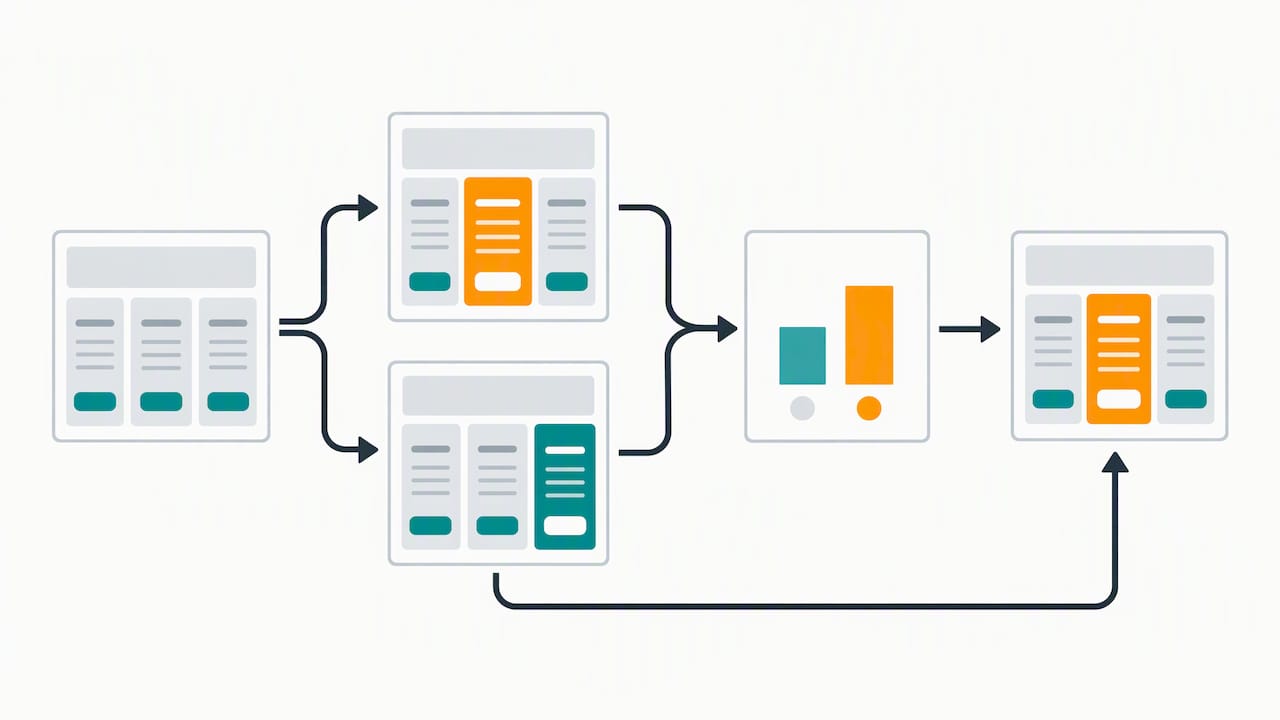
Track these metrics first: page conversion rate, CTA click-through rate, bounce rate, and lead-to-opportunity conversion. The last one matters because showing prices can reduce total lead volume while improving lead quality, so volume alone can mislead you.
Run experiments in this order:
- Headline and subheadline. Test a benefit-led version against your current copy.
- CTA copy and prominence. Compare specific wording against generic wording, and test button contrast.
- Recommended-plan badge. Add, move, or restyle it.
- Tier count and price display. Try three tiers against four, or an annual toggle against none.
Write each test as a hypothesis: “Changing the CTA from ‘Get started’ to ‘Start free trial’ will raise CTA clicks because it states the outcome.” Before launching, set your minimum detectable effect, the smallest lift worth acting on, and check whether your traffic can reach it in a reasonable window. Low-traffic pages often need bigger changes or longer runs.
BCG’s pricing research frames pricing as a strategic architecture that should be benchmarked against profit-maximizing structure rather than competitor matching alone, which is a good reason to treat the page as a standing experiment.
Use heatmaps and session replay to generate ideas: watch where people hesitate, which toggles they ignore, and where they scroll back up. For more tactical ideas on hypothesis generation, this guide to conversion rate optimization tips is a useful companion.
A checklist you can run this week
Sort the work by effort and run it in stages. Our priority-based landing page framework offers a similar way to rank tests on high-intent pages.
- First stage: Rewrite the headline for clarity, add a visible recommended badge, make the CTA more prominent, and add three FAQs.
- Days 8 to 30: Build the mobile accordion, add an annual toggle, and run a basic A/B test on CTA copy.
- Days 31 to 90 and beyond: Run full pricing experiments, restructure the comparison matrix, and finish analytics instrumentation.
| Timeframe | Focus | Metric to report |
|---|---|---|
| First stage | Headline, badge, CTA, FAQs | CTA click-through rate |
| 8–30 days | Mobile layout, annual toggle, CTA test | Mobile conversion rate |
| 31–90+ days | Tier and matrix experiments, analytics | Lead-to-opportunity conversion |
When you report to stakeholders, keep the dashboard simple: conversion rate, CTA click-through rate, bounce rate, and lead-to-opportunity conversion, each shown against the pre-change baseline. A short note on what you will test next keeps the program moving.
What a pricing page redesign looked like for one of our clients
A pricing page can list every plan feature in a single wide table and leave visitors to figure out the rest. The goal was to turn more visits into qualified inquiries without adding traffic.
Consider rewriting the headline around who the plans serve, stacking the plans as cards, adding a clearly marked recommended option, replacing the table with expandable feature groups on mobile, and rewriting the CTA to state the next step. Set up analytics events so every click on a plan or button can be tied to an outcome.
We measured conversion and engagement against the earlier baseline over a comparable period.
The lessons are easy to copy. Fix clarity before you touch price. Give mobile its own layout, not a squeezed desktop one. And instrument the page before you launch, so you can show what moved.
Where pricing teams go wrong
Pricing pages are under-tested because they feel too important to touch. Nobody wants to be the person who changed the page that drives revenue. The way out is to start with low-risk tests, like copy and badges, and show a clean result before asking for bigger swings.
My view is that most pages fail because they ask visitors to do analysis. Your job is to reduce effort and make the plan you want them to choose the easiest path. That is a design decision, not a trick.
Before any change ships, get product, sales, analytics, and design in one short review. Sales knows the objections, analytics knows what is measurable, and design knows what will actually be read.
— Derek
How we help with pricing-page redesign and testing

We design and test pricing pages as part of our Website Design work, backed by campaign management and SEO. A typical engagement moves from discovery to hypotheses, then design, test setup, and reporting. Start with a marketing assessment and tell us which page you want to fix first.
FAQ
How many plans should a pricing page show?
A limited number of tiers can make choices easier for most SaaS buyers. More than that makes comparison harder, and fewer can leave buyers without a clear step up. Limiting plans is a recurring recommendation in HubSpot’s best practices.
Should a pricing page show prices publicly?
Usually yes. Showing prices can reduce total lead volume, but it tends to improve lead-to-opportunity conversion because the people who inquire already accept the range. If your pricing is truly custom, show a starting point or a clear sales path.
What should I test first on a pricing page?
Start with the headline and the CTA copy, since they are quick to change and easy to measure. Then test the recommended-plan badge, and only after that change tier count or price display.
How do I show a comparison table on mobile?
Avoid horizontal scrolling. Use accordions, swipeable tabs, or a selectable side-by-side comparison, as Smashing Magazine’s pricing UX guidance recommends.
Sources
- Pricing Page Best Practices + Examples | Figma
- Designing Effective Pricing Plans UX — Smashing Magazine
- 9 Best Practices for Creating a High Converting Pricing Page (With Examples)