
Server-side tracking processes and forwards event data from a server you control instead of relying on browser-executed third-party tags. Use it when you need more reliable data, tighter privacy controls, or cookies that survive longer than browsers now allow. The typical stack pairs a Google Tag Manager server container with Google Cloud Platform (GCP) or Cloud Run, then forwards events to GA4 through the Measurement Protocol. It matters because ad blockers and browser restrictions are estimated to wipe out 10 to 30 percent of client-side data before it ever reaches your reports.
Key Takeaways
Server-side tracking improves data reliability and privacy control by processing events on infrastructure you own rather than in the visitor’s browser.
| Point | Details |
|---|---|
| Core mechanism | Events route through a server-controlled container instead of firing directly from the browser to vendors. |
| Reliability gain | Server-side setups sidestep much of the 10 to 30 percent data loss client-side tracking suffers from ad blockers. |
| Real cost | Production Cloud Run environments typically run $30 to $50 or more per server monthly, plus egress fees. |
| Minimum redundancy | Google recommends at least three instances per server container before relying on it for live traffic. |
| Agency support | Theartistevolution audits and implements server-side tracking setups with consent-first design and production hardening. |
Where Can You Learn More About Server Side Tracking?
- Google’s server-side tagging overview covers provisioning, custom domains, and production sizing.
- Server-side tagging fundamentals explains clients, events, and container architecture.
- Matomo’s client vs. server-side explainer breaks down the practical comparison.
- Cookiebot’s guide focuses on consent and compliance angles.
A Practical Take on When Server Side Tracking Is Worth It
In most engagements, a hybrid approach beats a full rip-and-replace: keep client-side tags where they still serve a purpose, and move the high-value, high-loss events to server-side first. Consent-first design isn’t a compliance checkbox, it’s what determines whether the data you collect is even trustworthy. Measure business impact on a pilot before committing to a full rollout.
Ready to Audit Your Tracking Setup?
If reading through the architecture, the hosting decisions, and the consent checklist above left you thinking “we need this, but not the headache of building it alone,” that’s exactly the gap Theartistevolution’s marketing tools service closes. Instead of hiring a full-time engineer to provision, monitor, and version-control a server container, you get a team that’s already built these stacks handling the audit, implementation, and ongoing monitoring for you.

Scope typically covers three phases: an audit of your current tracking gaps, implementation of the server container and vendor integrations, and monitoring once you’re live. If your ad spend depends on GA4 or Meta conversion data that you suspect is incomplete, start with a marketing assessment to see exactly where your current setup is leaking data before committing to a full build.
Table of Contents
- What Is Server Side Tracking, Really?
- How Does Server Side Tracking Actually Work?
- What Are the Benefits of Server Side Tracking?
- What Are the Drawbacks and Costs of Server Side Tracking?
- When Should You Adopt Server Side Tracking?
- How Do You Set Up Server Side Tracking?
- How Do You Keep Server Side Tracking Private and Secure?
- Frequently Asked Questions
- Sources
What Is Server Side Tracking, Really?
Server-side tracking and server-side tagging describe the same shift: moving data collection off the visitor’s browser and onto infrastructure your business controls. Instead of a tag firing directly from a webpage to a dozen ad platforms, the browser sends one request to your server, which then decides what to do with it.
The differences from client-side tracking show up in a few concrete places:
- Data collection point: client-side happens in the visitor’s browser; server-side happens on your infrastructure.
- Control: you own the server, the logic, and what leaves it, rather than trusting each vendor’s script.
- Ad blocker exposure: browser extensions and privacy tools routinely block third-party scripts, contributing to that 10 to 30 percent data loss most client-side setups quietly absorb.
- Cookie classification: cookies set from your own domain read as first-party, which browsers treat far more leniently than third-party cookies.
- Page speed: fewer scripts loading in the browser generally means a faster page.
Google Tag Manager’s server container, GA4’s Measurement Protocol, and Meta’s Conversion API are the three names you’ll encounter constantly here. They aren’t competing options so much as pieces that often work together.
How Does Server Side Tracking Actually Work?
Picture the flow this way: a visitor takes an action, your web container or a client library sends an HTTP request to your server container, and from there the real work begins. The server container runs clients, which parse that incoming request and convert it into a standardized event, the same object model Google’s own architecture docs describe. Once an event exists, triggers decide which tags should fire, and those tags either send data out to vendors like GA4 or Meta, or store it internally for your own warehouse.
The core components break down simply:
- Clients — parse incoming requests into structured events.
- Server container — the environment that hosts clients, tags, and triggers.
- Tags — the outbound actions, like sending an event to a GA4 property.
- Triggers and variables — the logic and data references that connect events to tags.
For hosting, Google Tag Manager offers automatic provisioning on Cloud Run, which spins up infrastructure with minimal setup, or you can run a self-hosted Docker deployment on your own cloud instances if you need more control. Either way, Google’s own documentation recommends mapping a custom subdomain to your tagging server rather than using a generic cloud URL, since that’s what lets cookies set from the server register as first-party.
For production traffic, don’t run on a single instance. Google’s guidance points to at least three instances per container for redundancy, so a single failure doesn’t quietly drop live conversion data.
Pro Tip: Sketch the architecture as a straight line before you build anything: browser → your subdomain → server container → clients → tags → vendors. If any engineer on your team can’t draw that in thirty seconds, the setup needs a simpler explanation before it needs more code.
What Are the Benefits of Server Side Tracking?
The upside isn’t theoretical. It shows up in three places marketers actually care about: measurement accuracy, page performance, and privacy posture.
- Higher data reliability — routing events through your server sidesteps a meaningful share of the 10 to 30 percent loss that ad blockers cause on the client side.
- Faster pages — fewer third-party scripts executing in the browser means less render-blocking JavaScript competing for load time.
- Stronger privacy controls — you can strip or hash personally identifiable information before it ever reaches a vendor, and enforce consent decisions in one central place rather than hoping every tag respects them.
- More durable cookies — first-party cookies set from your own subdomain typically survive longer under browser restrictions like ITP than third-party equivalents.
The knock-on effect hits attribution and ad performance directly. Cleaner, more complete event data means bidding algorithms on platforms like Google Ads get better signals to optimize against, and gaps in incrementality testing shrink because fewer conversions are silently missing from the dataset. If your reporting dashboards have ever shown numbers that don’t match what your sales team reports, this is often where the gap starts.
What Are the Drawbacks and Costs of Server Side Tracking?
None of this is free, and pretending otherwise sets teams up for a rough rollout. The trade-offs are real:
- Engineering effort — someone has to provision, configure, and maintain the server container; this isn’t a drop-in tag anymore.
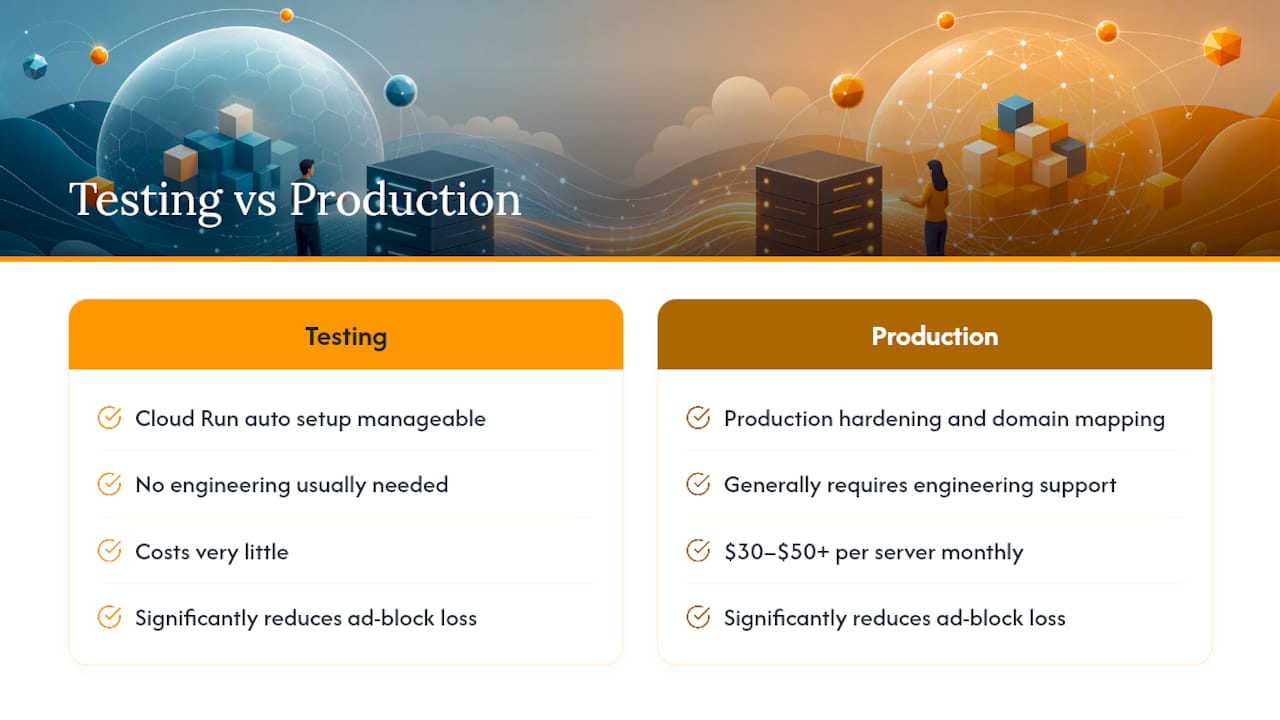
- Infrastructure costs — automatic provisioning on Cloud Run works fine for testing, but production environments typically run $30 to $50 or more per server monthly, scaling with traffic and instance count.
- Partial coverage — some vendor features still need client-side signals, particularly detailed UI interactions the server never sees, so server-side tagging augments rather than fully replaces client-side tags.
- Latency considerations — routing events through an extra hop can add small delays for use cases that depend on true real-time data.
Budget for egress costs too, not just compute. Traffic scaling tends to surprise teams who only priced the baseline instance.
When Should You Adopt Server Side Tracking?
Not every site needs this. A few scenarios make the investment worth it:
- Large e-commerce sites running conversion-driven bidding benefit most, since accurate purchase data feeds algorithms directly.
- Sites heavily affected by ad blockers or Safari’s ITP see the clearest reliability gains.
- Organizations needing centralized consent enforcement across many tags and vendors get a single control point instead of dozens of scattered configurations.
- Healthcare, legal, or other regulated industries requiring strict PII handling should treat server-side as close to mandatory rather than optional. (See our HIPAA compliant marketing guide for the specifics.)
- Multi-channel stacks juggling GA4, Meta, and other platforms benefit from a single gateway instead of managing each integration separately.
If none of those describe your situation, a hybrid approach, keeping some client-side tags and adding server-side selectively, is often the more sensible starting point.
How Do You Set Up Server Side Tracking?
Hand this checklist to whoever owns the build, whether that’s an internal engineer or an outside team.
- Plan your data model and consent signaling first. Marketing defines what events matter and how consent states should map to outgoing vendor calls before any infrastructure gets touched.
- Choose a hosting and provisioning approach. Automatic GCP/Cloud Run provisioning is fastest for testing; manual Docker deployment gives more control for production at scale.
- Create the GTM server container in your Tag Manager account.
- Provision the tagging server, either through Google’s automatic Cloud Run setup or a manually deployed instance.
- Map a custom subdomain to the server so cookies register as first-party, following Google’s own domain guidance.
- Point your web container or gtag.js to the new
server_container_url. - Install clients and tags, including the GA4 client, Measurement Protocol tag, and a Meta Conversion API adapter if you run Meta ads.
- Preview and debug every event before touching live traffic; validate that data lands correctly in GA4 and any connected ad platforms. Google Analytics’ own traffic-checking methods, outlined in this guide to identifying LLM traffic in GA4, are a useful model for the kind of validation discipline this step demands.
- Scale instances and set redundancy, then move to production.
Plan on marketing owning steps 1 and roughly half of step 8, product owning consent logic, and engineering owning provisioning and deployment. For production, three instances is the recommended floor for redundancy, with autoscaling rules set to handle traffic spikes and monitoring in place to catch dropped requests before they become a pattern.
Pro Tip: Run production and preview environments side by side for at least a week before fully cutting over. Comparing the two datasets daily catches configuration mistakes that a single afternoon of testing will miss.
How Do You Keep Server Side Tracking Private and Secure?
Privacy and security aren’t separate concerns here; they’re built into the same server layer.
On privacy, strip or hash PII before it leaves your server, and centralize consent enforcement so a single decision point governs every outgoing vendor call rather than leaving it to individual tags. Server-side tagging can support GDPR-style consent workflows when paired with a consent management tool, though it doesn’t guarantee compliance on its own. Favor first-party cookies wherever the vendor supports them.

On security, treat the server container like any other production endpoint: require authentication for management APIs, apply least-privilege IAM roles so only the people who need access have it, and monitor logs for unusual request patterns. For monitoring, set baselines for expected event volume, alert on error-rate spikes, and reconcile server-side numbers against client-side signals periodically to catch drift early.
Pro Tip: Version control your server container configuration the same way you’d version an application codebase. A rollback option turns a bad tag change from a crisis into a five-minute fix.
What Do Common Server Side Tracking Stacks Look Like?
Three setups cover most real-world needs:
- GTM server container + Cloud Run + GA4/Measurement Protocol — the standard stack for teams already using Google’s ecosystem; fastest to deploy, moderate cost.
- Server-to-server API gateway + Meta Conversion API — built specifically for ad platform integrations when Meta is a primary channel; narrower scope, tighter focus.
- Self-hosted Node.js Docker container with a data warehouse sink — maximum control and custom routing, but the highest engineering lift and slowest to launch.
How Does an Agency Approach Server Side Tracking Projects?
Theartistevolution treats server-side tracking as an infrastructure decision, not a quick tag swap. Projects start with consent-first design, move through staged testing, and end with production hardening before any client relies on the data for ad spend decisions.
A tracking setup that isn’t consent-first from day one usually needs to be rebuilt later anyway, at twice the cost and half the goodwill.
Reach out if you want a production-readiness audit before you scale traffic through a new server container.
Frequently Asked Questions
Is server-side tracking difficult to set up without an engineer?
Provisioning a GTM server container through Cloud Run’s automatic setup is manageable for a technical marketer, but production hardening, custom domain mapping, and vendor integrations generally need engineering support.
Does server-side tracking replace Google Analytics 4?
No. GA4 still receives and reports your data; server-side tracking changes how that data reaches GA4, typically through the Measurement Protocol instead of a direct browser call.
Will server-side tracking fix all my ad blocker data loss?
It significantly reduces it, since requests go through your own domain instead of a blockable third-party script, but some vendor tags still require client-side signals for UI-level events.
How much does server-side tracking cost to run monthly?
Testing environments on automatic Cloud Run provisioning cost very little, but production setups with proper redundancy typically run $30 to $50 or more per server monthly, scaling with traffic.
Do I still need consent management with server-side tracking?
Yes. Server-side tagging centralizes where consent gets enforced, but you still need a consent management tool feeding it accurate visitor decisions.
Sources
- Server-side tagging | Google Tag Manager – Server-side | Google for Developers
- Server-side tracking vs client-side tracking: What you need to know – Analytics Platform – Matomo
- Server-side tagging fundamentals | Google for Developers
- What Is Server-side Tagging – Cookiebot