
A law firm’s Google Business Profile is the free listing that shows your name, phone number, hours, reviews and map location when someone searches for a lawyer nearby. Set it up with your real firm name, a real street address and the most specific practice category available. Verify it, then keep it active with reviews, photos and accurate hours. This guide walks through each step, the rules that trip up attorneys, and what to do after the profile goes live.
TL;DR
- Claim or create the profile with a Google Account, then verify it. Law firms are commonly asked for a single, unedited video of the office.
- Use your firm’s real-world name, a real street address and as few categories as possible, choosing the most specific ones.
- Virtual offices and PO boxes are not accepted as addresses, and the firm must be able to meet clients face to face.
- Reviews, photos, accurate hours and a profile tied to your website do most of the work after setup.
- Respond to every review professionally, and never reveal client information in a reply.
Table of Contents
- Why your Google Business Profile matters for a law firm
- Can your firm have a profile? The eligibility rules
- Step-by-step: how to set up your law firm’s profile
- How to optimize the profile once it is live
- Perspective: what we see when law firms come to us
- Common mistakes that hurt law firm profiles
- Where the profile fits in your wider marketing
- When to hand it off
- A 30-day plan for a new or neglected profile
- FAQ
- Sources
Why your Google Business Profile matters for a law firm
People rarely pick a lawyer from a list of names. They search, glance at the map results, check star ratings and call the firm that looks active and trusted. Your profile is often the first impression you make, before anyone sees your website.
The American Bar Association notes that claiming a free profile can improve a lawyer’s website search visibility and lets the firm update its details and see how prospective clients found it. It also points to hours, images, videos and the right primary category as key actions that motivate a potential client to get in touch.
The profile costs nothing, which is why it is the first local asset we check when a firm tells us its phone is quiet. A thin, unverified or outdated profile hands those calls to the firm down the street.
Can your firm have a profile? The eligibility rules
Google ties eligibility to real-world contact. According to Google’s own getting-started guidance, a business must make face-to-face contact with customers during business hours, whether at a storefront or by visiting them. Depending on the category, the listing can show a street address, a service area or a place marker.
For lawyers, this plays out in a few common situations:
| Your situation | What to expect |
|---|---|
| Office with a sign and walk-in or scheduled meetings | Eligible. Show the street address. |
| Shared or executive suite where you meet clients | Generally workable if you are staffed and meet clients there during stated hours. |
| Home office where you meet clients | Possible, but consider whether to show the address or a service area. |
| Virtual office or PO box | Not accepted as an address. Search Engine Land’s guide states this plainly. |
| Fully remote firm with no in-person meetings | Likely ineligible. Focus on your website, directories and other channels. |
If you travel to clients, such as hospital visits for personal injury or home visits for estate planning, a service area may fit. Check the current rules on the official page before choosing, because the display options depend on your category.
Step-by-step: how to set up your law firm’s profile
1. Sign in with the right Google Account
Use an account the firm controls, not a personal address that belongs to one associate. Google’s setup instructions start with creating or using a Google Account and then adding or claiming your business. Search for the firm first. If a listing already exists (often created from public data), claim it instead of creating a duplicate.
2. Enter your firm name exactly as clients know it
Google’s representation guidelines say to use your real-world name as consistently shown on your storefront, website and stationery, and as known to customers, without unnecessary extras. That means no keywords stuffed into the name. “Smith & Alvarez, Attorneys at Law” is fine if that is your signage. “Smith Alvarez Best Dallas Car Accident Lawyer Cheap” is a fast route to a suspension.
If you are still deciding how the firm should present itself, our guide to law firm branding for solo and small firms helps you settle the name and identity before it spreads across dozens of listings.
3. Choose your categories carefully
Google’s guidance is to pick as few categories as possible to describe your core business, and to choose the most specific ones available. If nothing specific fits, go with a more general option. For lawyers, that usually means one primary category matching your main practice (for example, a specialty such as divorce or personal injury where one exists) and, at most, a small number of secondary ones.
The primary category carries weight, as the ABA article above notes. Choose it based on what you want to be found for, not on what the firm technically does on the side.
4. Add your address or service area
Enter the address exactly as it appears on your website and signage, including suite number. Address, service area, hours and category each have their own fields, so do not cram them into the business name or description. If you serve clients at their location, define a service area realistically: the cities and counties you genuinely cover, not an entire state.
5. Add phone, website and hours
Use a local number that your staff answers, and the specific page of your site that best serves the profile visitor. Set hours that reflect when someone truly picks up. Wrong hours lead to missed calls and one-star reviews from people who could not reach you.
If your firm offers after-hours consultations by appointment, say so in the description rather than listing 24/7 availability you cannot support.
6. Verify the profile
Nothing you add will show publicly until Google confirms the business is real. Search Engine Land reports that law firms are commonly verified by video: one continuous, unedited recording that shows the real location, how you access it and evidence that it is your business, such as signage or office materials. Google’s review of a video can take at least five days, and a profile typically appears in search within one to two weeks after successful verification.
Tips that save a resubmission:
- Film outside first: the street, the building sign, then walk in without cuts.
- Show the door or key you use to enter, and the suite number.
- Show something that ties the space to the firm, such as a reception sign, desk nameplate or branded materials.
- Do not edit, splice or add effects.
If you are setting up the profile today, expect it to take days or weeks, not minutes. It will not appear in searches immediately.
How to optimize the profile once it is live
Verification gets you onto the map. Optimization is what earns you the click. Here is the order we would work in.
Complete every field
Fill in hours, special hours for holidays, phone, website, appointment link if you use one, and a description that explains who you help and where. Write for a person in trouble, not for a search engine. “We represent individuals and families in divorce, custody and support matters in Travis County” does more than a list of keywords.
The ABA’s guidance on maximizing profiles for lawyers singles out hours, images and videos, and the correct primary category. Treat those three as the baseline.
Add real photos and video
Upload your exterior, entrance, reception, conference room and the attorneys themselves. Prospective clients are often nervous about walking into a law office, and seeing it helps. Avoid stock photos. Add a short introduction video if you have one, and include a clear photo of the building so people can find the door.
Build a steady review habit
Reviews are where most firms stall. The ABA advises asking satisfied clients to leave reviews on Google, Yelp and other sites, thanking clients for positive reviews and addressing negative feedback professionally.
A workable routine:
- Ask at a natural high point: a favorable result, a closed matter, a thank-you email.
- Send the direct review link by email or text, so it takes one tap.
- Make it a standing step in your case-closing checklist, not a one-off push.
- Reply to every review within a few days.
When you reply, keep confidentiality front of mind. Do not confirm that the reviewer was a client, and never reference case details, even when the review is negative and unfair. A short, courteous reply that invites the person to call the office is the safe default. Your state bar’s advertising and confidentiality rules govern what you can say, so check them, and see our attorney advertising rules checklist for the pre-launch points we run through with law firms.
Also avoid incentivizing reviews with discounts or gifts. That can violate Google’s policies and, depending on your state, professional conduct rules.
Keep your details identical everywhere
Your firm’s name, address and phone number should match across your website, state bar listing, legal directories and social profiles. Small variations (Suite vs. Ste., an old phone number) confuse both people and search engines. Audit these listings twice a year, and again after any move or staffing change.
Use posts and updates sparingly but consistently
Short updates about a new attorney, a community event, a seminar or a change in office hours show the profile is maintained. Keep it factual and avoid anything that reads as a guarantee of results, which many bar associations restrict.
Connect the profile to your website
The profile should send visitors to a page built for them: ideally a practice-area or location page with the same name, address and phone, clear services and an obvious way to call. If your site is dated, that page is where a lot of local calls are lost. Our local SEO blueprint for brick-and-mortar businesses covers the on-site side in more depth.
Perspective: what we see when law firms come to us
In our 18 years of building and managing campaigns, the pattern with law firms is consistent. The profile exists, but nobody owns it. It was created years ago by a former staffer, hours are off, there are eight reviews from 2021 and the website link goes to the home page.
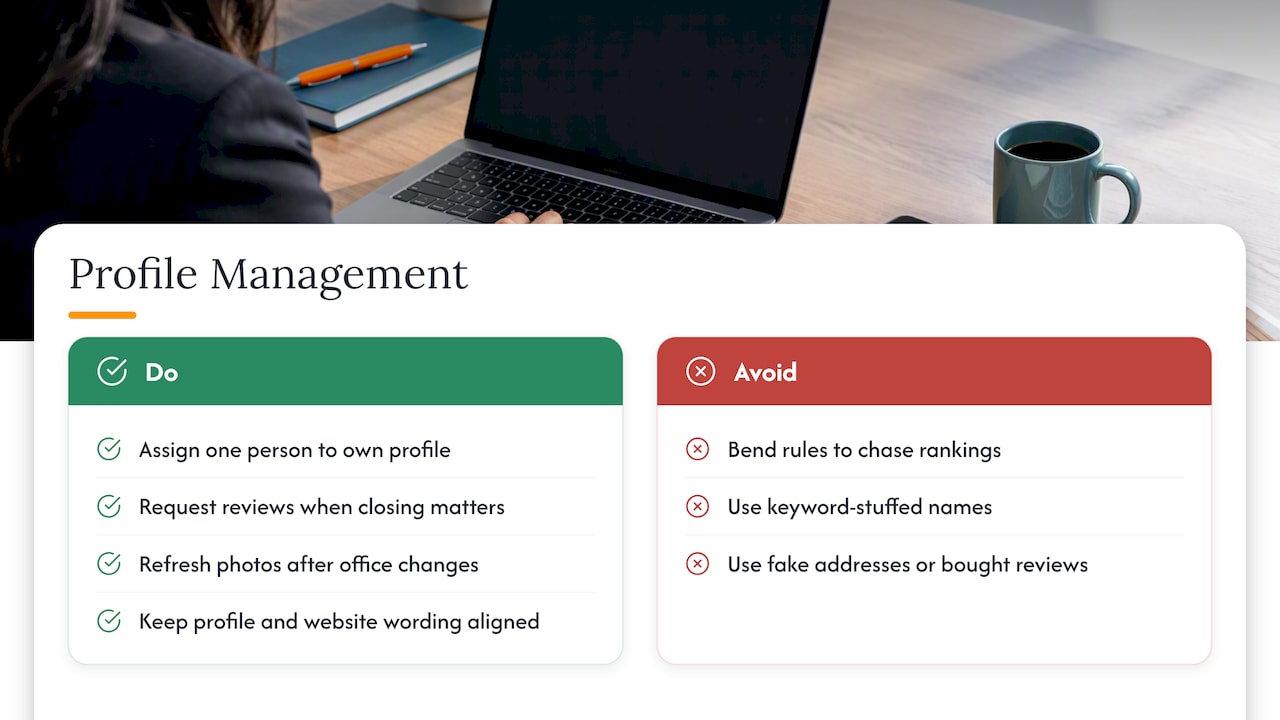
The fix is rarely clever. It is operational. One person owns the profile. Reviews are requested as part of closing a matter. Photos are refreshed after any office change. The profile and the website say the same thing in the same words.
We also push firms to treat the profile as one part of a larger system rather than a standalone trick. The profile earns trust in the map results, the website converts that trust into a consultation, and paid channels fill gaps while organic visibility builds. That is why we work across strategy and execution, as an extension of the firm’s team, rather than handing over a checklist and walking away.
One caution from experience: do not chase rankings by bending the rules. Keyword-stuffed names, fake addresses and bought reviews can lead to a suspended profile, and a suspension at the wrong moment costs more than any shortcut gains.
— Derek
Common mistakes that hurt law firm profiles
- A virtual office address. Not accepted, and a common reason for suspension.
- Too many categories. Google advises as few as possible. Diluting the profile with a dozen practice areas blurs what you want to be found for.
- Keywords in the firm name. The name should be how clients actually know you.
- Duplicate listings. Old listings from a previous address or partner name split your reviews and confuse searchers. Claim and fix or request removal rather than ignoring them.
- Ignoring negative reviews. A calm, professional reply shows prospective clients how you handle conflict.
- Disclosing client details in replies. Never confirm representation or discuss the matter publicly.
- Set and forget. An unmaintained profile with stale hours and no new reviews signals an inactive firm.
Where the profile fits in your wider marketing
The profile is the foundation of local visibility, but it is not the whole structure. Three pieces commonly work alongside it:
- Local SEO and your website. Practice-area pages, location pages and consistent citations reinforce what the profile claims. If you operate offices in several cities, each location needs its own page and profile; see our multi-location SEO playbook.
- Paid search. Pay-per-click ads capture people ready to hire right now. Our law firm PPC guide explains how to structure campaigns to sign cases rather than collect clicks.
- Local Service Ads. For many practice areas, these pay-per-lead placements sit above the map results. Our walkthrough of Local Service Ads for lawyers covers setup, Google Screened and CRM tracking.
When to hand it off
Setting up a profile is a one-afternoon job plus the verification wait. The harder part is the ongoing work: review requests, monitoring, website alignment, and tying calls back to cases. If your attorneys would rather practice law, that is where an agency earns its fee.
We build and manage local visibility for law firms as part of broader SEO and campaign management, with reporting that shows which channels produce consultations. We do not publish prices, because scope depends on your practice areas, markets and starting point. Tell us where your firm stands and we will tell you where the biggest gaps are.

Ready to talk? Contact The Artist Evolution and we will review your profile, website and local presence with you.
A 30-day plan for a new or neglected profile
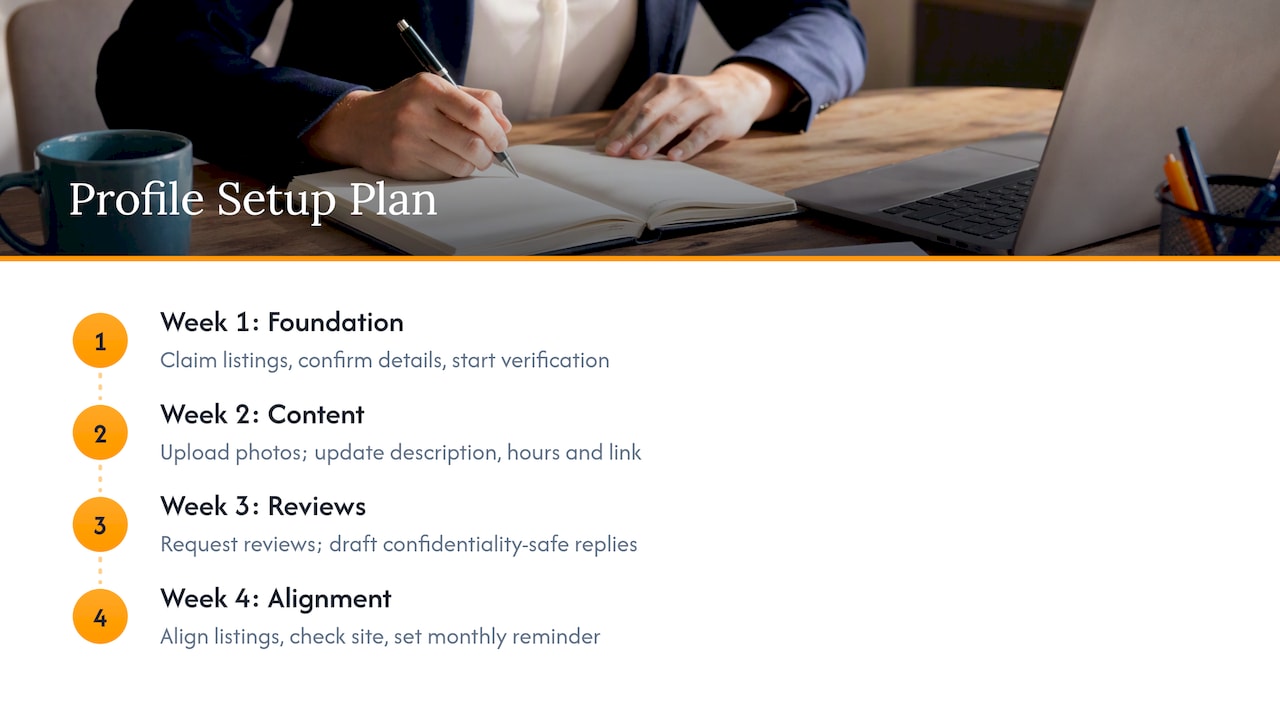
Week 1: foundation. Search for existing listings and claim or consolidate them. Confirm name, address and phone match your website. Choose the primary category and a minimal set of secondary ones. Start verification.
Week 2: content. Upload real photos of the exterior, interior and team. Write a client-focused description. Set accurate hours, including holiday hours. Link to the most relevant page on your site.
Week 3: reviews. Add the review request to your case-closing process. Send the link to recent satisfied clients where appropriate and permitted by your state’s rules. Draft a standard, confidentiality-safe reply template you can adapt.
Week 4: alignment. Audit your directory and bar listings for consistent details. Check that the website page the profile links to loads fast on a phone and makes calling easy. Set a monthly reminder to review the profile.
After that, a monthly ten-minute check is enough for most small firms: new reviews answered, any hours changes updated, one or two new photos and a glance at the profile’s performance data.
FAQ
How long does it take for a law firm’s Google Business Profile to show up?
Not immediately. Verification video reviews can take at least five days, and a profile typically appears in search within one to two weeks after it is verified, according to Search Engine Land. Rankings then build over time as you add reviews and activity.
Can I use a virtual office or PO box for my law firm’s profile?
No. Virtual offices and PO boxes are not acceptable addresses. Google also requires that the business make face-to-face contact with customers, so you need a location where you actually meet clients or a service area you travel to.
Which category should a law firm choose?
Choose the most specific category that describes your core practice, and keep the total number of categories as low as you can. If no specific category matches, use a more general one. Google’s guidelines recommend exactly this approach.
How should a lawyer respond to a negative Google review?
Reply promptly, politely and briefly, and invite the person to contact the office. Do not confirm they were a client or discuss any detail of the matter. The ABA recommends addressing negative feedback professionally. Check your state bar’s confidentiality and advertising rules before posting.
Sources
- Get started with Google Business Profile, Google Business Profile Help
- Guidelines for representing your business on Google
- How to set up and optimize your Google Business Profile, Search Engine Land
- Maximizing Google Business Profiles for Lawyers, American Bar Association
- How To Get Clients as a Lawyer: 11 Steps to Success, American Bar Association
- Tips for Law Firms on How to Take Control of Their Online Presence, American Bar Association