
Dental website conversion is the share of visitors who take the step you want, usually calling, requesting an appointment or booking online. You raise it by making that step obvious, short and trustworthy on every page, then measuring which changes actually bring in patients. This guide shows how to calculate your rate, find where visitors drop off and fix the most common leaks.
TL;DR
- Conversion rate is conversions divided by website visits over the same period. Define what counts as a conversion before you measure.
- Many patients still pick up the phone, so a click-to-call button matters as much as an online form.
- Every extra step, login or follow-up call in a booking flow costs you inquiries. Test the whole path yourself.
- Service pages, reviews, clear provider information and a fast, accessible mobile site build the trust that gets a visitor to act.
- Track where new patients come from, review results every three months and judge a campaign over 12 months.
Table of Contents
- What dental website conversion actually means
- Why dental website visitors leave without booking
- Build a short, forgiving path to booking
- Give every service its own page and one clear next step
- Add the trust signals patients look for
- Speed, mobile experience and accessibility
- Measure conversions and know what is working
- A 30-day dental website conversion checklist
- Our perspective: conversion is a marketing system, not a page tweak
- How we help dental practices convert more visitors
- FAQ
- Sources
What dental website conversion actually means
A conversion is a visitor completing a predefined goal, such as contacting the office or scheduling an appointment. The conversion rate is the number of conversions divided by website visits over the same period.
Here is a simple illustration (the numbers are invented to show the math): if your site had 800 visits last month and 24 of them ended in a call, a form or a booked slot, your conversion rate is 24 ÷ 800 = 3%. If you improve nothing about traffic but move that to 36 inquiries, you have 50% more new-patient opportunities from the same visitors.
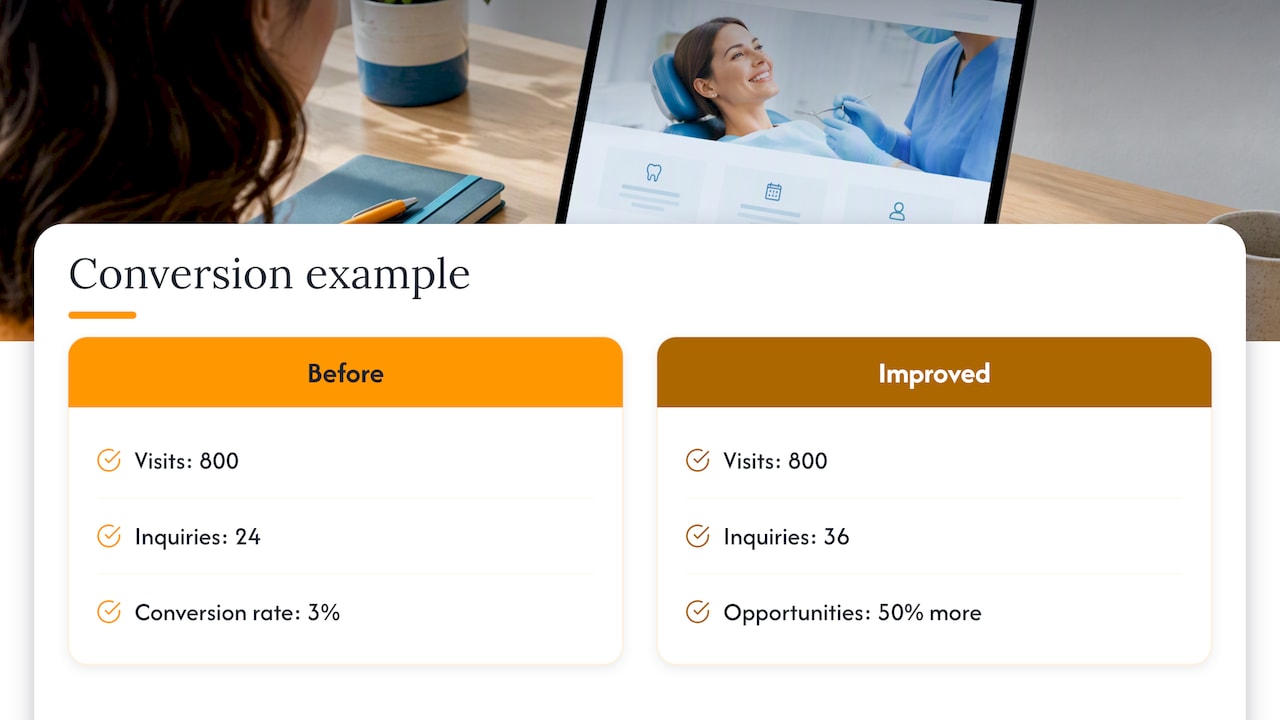
That is why conversion work often beats buying more traffic. Ads and SEO bring people to the door. The website decides whether they walk in.
Decide what counts as a conversion
A practice usually has more than one goal. Rank them so your reporting is honest:
- Primary conversions: booked appointments, appointment requests, phone calls from the site.
- Secondary conversions: new-patient form starts, insurance questions, direction requests, emergency page visits.
- Not conversions: page views, time on site, social follows. They can signal interest, but they do not fill the schedule.
Keep the definitions the same month to month. A rate that changes because the goal changed tells you nothing.
Why dental website visitors leave without booking
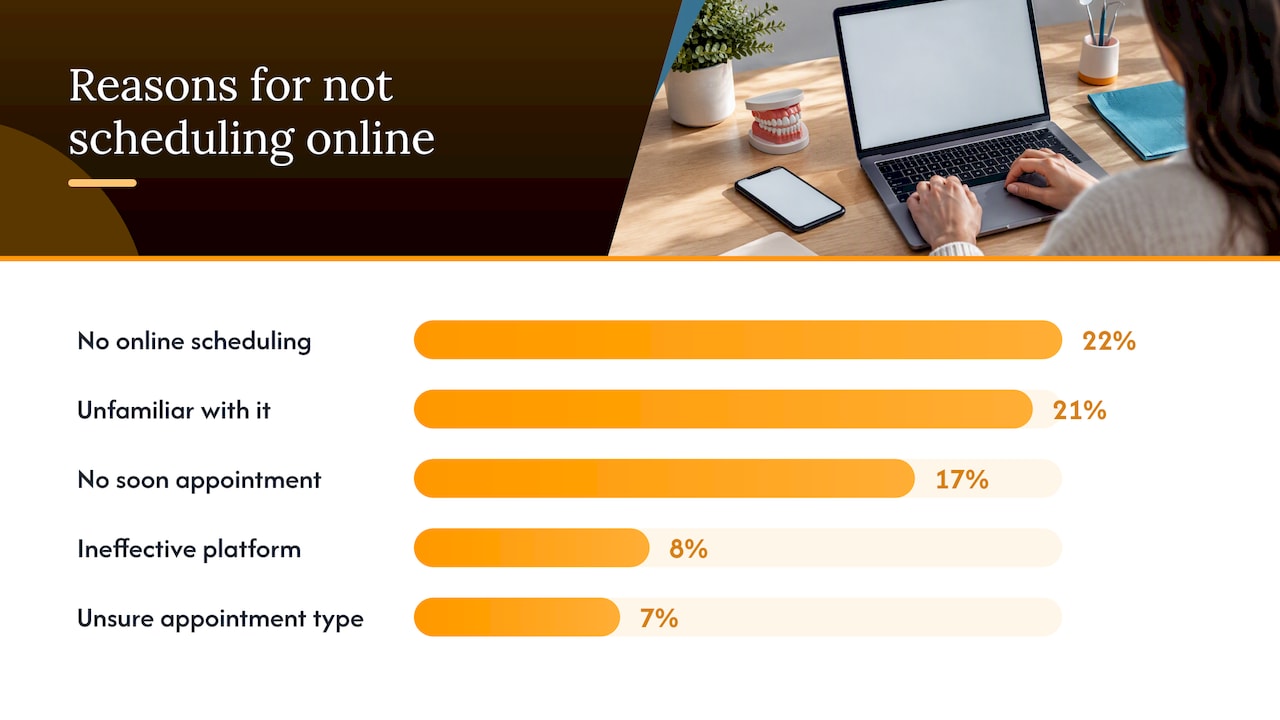
Most drop-offs trace back to friction, not to a lack of interest. Two U.S. surveys show what that friction looks like in healthcare scheduling in general, and dental patients behave much the same way.
In a survey of 1,034 U.S. adults reported by Becker’s Hospital Review, people who had not scheduled online gave these main reasons:
| Reason for not scheduling online | Share of respondents |
|---|---|
| Provider did not offer online scheduling | 22% |
| Unfamiliar with online scheduling | 21% |
| Could not get an appointment soon enough | 17% |
| Platform was ineffective | 8% |
| Unsure what appointment type they needed | 7% |
A separate 2022 survey of 1,005 patients found that 61% said they had not accessed care in the past year because online self-scheduling was too complicated, and 70% said they started booking online but were sent to a phone call to finish.
Translate that into dental terms and you get a short list of leaks to check:
- No clear way to book. The visitor cannot find a button or form without scrolling or hunting through menus.
- A booking tool that hands off to the phone. The patient begins online and is told to call anyway.
- No available times that fit. Visitors see a calendar with nothing soon or nothing after work hours.
- Confusion about which appointment to choose. A first-time patient does not know whether they need a cleaning, an exam, or an emergency visit.
The fix for the last one is cheap: label options in plain language, such as “New patient exam and cleaning” or “My tooth hurts, I need to be seen,” instead of procedure codes or internal names.
Build a short, forgiving path to booking
The best conversion path matches how your patients actually reach out. Do not assume everyone wants a portal.
Keep the phone front and center
A 2025 study of U.S. adults found that phone calls remained the most common way people scheduled medical appointments: 72.1% used calls for at least one appointment and 56.4% named calls as their primary method. Provider portals were used by 34.1% and were the primary method for 19.7%. The study also noted that inaccurate provider contact information may particularly affect new patients.
For a dental site, that means:
- A tap-to-call number in the header that stays visible on mobile.
- The same phone number, address and hours everywhere: your site, Google Business Profile and directories.
- A phone line that is answered, or a voicemail and callback promise you actually keep.
A site can win the click and lose the patient at the front desk. Treat the call as part of the conversion.
Offer online booking that does not make people work
Online options still matter. The ADA’s own booking guide says nearly 70% of patients prefer booking online and 93.9% are more likely to choose a business that offers it. Treat those as the ADA’s published figures rather than a guarantee for your market, but the direction is clear: give people the choice.
What makes an online flow convert? A 2023 U.S. consumer scheduling study found patients commonly wanted easier login and navigation, more available times, fewer steps, no follow-up call, and immediate email or text confirmation. Build to that list:
- Let new patients request an appointment without creating an account.
- Ask for the minimum: name, phone or email, preferred time, reason for visit.
- Show a confirmation on screen and send a text or email right away.
- Put digital intake forms after the booking, not before it.
- Reply to every request quickly, ideally the same business day.
A 2026 article in the ADA’s Virginia Dental Journal makes the same point about younger patients: prospective Gen Z patients may move on when scheduling feels difficult or outdated. Its recommendations include mobile-friendly sites, online scheduling, digital forms, fast inquiry responses and plain-language insurance and pricing information.
Test the path yourself
The ADA’s New Dentist Blog described a Chicago practice that tested its own scheduling journey with fake appointments. Its founders reasoned that if the process was not satisfactory to them, patients would not be satisfied either. Copy that habit. Once a month, book an appointment from your phone on cellular data, then call the office as a stranger would. Write down every moment you hesitated.
Give every service its own page and one clear next step
A visitor searching for implants, Invisalign or an emergency visit does not want to land on a generic home page. Dedicated pages for each treatment match what people searched for and answer the questions that stop them from calling.
A service page that converts usually has:
- A headline in the patient’s words (“Dental implants in [your city]”).
- A short explanation of what the treatment is, who it suits and what a visit looks like.
- Plain-language information on insurance and payment. The Virginia Dental Journal article recommends this, along with transparent expectations to reduce anxiety.
- One primary button (“Request an appointment”) repeated at the top, the middle and the bottom.
- Photos of your real office and team rather than generic stock imagery.
Keep a single dominant action per page. When a page offers a call button, a form, a chat widget, a newsletter signup and three social links with equal weight, visitors do none of them.
Keep the site responsive and consistent
The ADA’s marketing checklist recommends a responsive website that attracts prospective patients and serves existing ones, with consistent branding. Consistency is a conversion tool. When your logo, colors, tone and photography match across your site, ads and profiles, the practice looks established. Our guide to dental practice branding covers how to build that identity so it supports bookings.
Add the trust signals patients look for
Dental care is personal and often anxiety-provoking. A visitor decides quickly whether your practice feels safe.
Reviews
The ADA advises asking satisfied patients for referrals and online reviews, noting that many prospective patients read reviews, which can influence their decisions. Show your strongest reviews near the booking button, not buried on a testimonial page. Because patient information is protected, handle replies and testimonials carefully. Our HIPAA-first guide to healthcare reputation management explains how to respond without exposing protected details.
Who you are and what you are qualified to do
The ADA’s teledentistry policy is written for remote care, but its principle applies to any dental site: patients should be able to see provider licensure and qualifications in advance, know who their providers are and what costs to expect, and have their private health information protected. A good team page therefore includes:
- Each dentist’s name, photo, credentials and areas of focus.
- A short, human bio (why they became a dentist, what they enjoy treating).
- Clear privacy language near any form that collects health information.
- Transparent cost and payment guidance wherever you can give it.
Speed, mobile experience and accessibility
Most first visits to a dental site come from a phone, often from someone with a toothache or a free minute. Mobile experience is not a feature you add later.
Check these on a real phone, not just a desktop preview:
- The call button is reachable with a thumb.
- Forms are short and use the right keyboard for each field (number pad for phone, email keyboard for email).
- Pages load without layout jumps and without heavy auto-playing video.
- Pop-ups do not cover the booking button.
Accessibility belongs in the same conversation. Under Title II of the ADA, Section 504 and Section 1557, covered entities must ensure their electronic information technology is accessible to people with disabilities. Whether those rules apply to your practice depends on your setup, so confirm with your legal counsel. In practice, accessible design also converts: readable text, strong color contrast, labeled form fields, keyboard navigation and alt text help every visitor, including older patients. We lay out a practical timeline in our guide to U.S. ADA website accessibility and a 180-day plan.
Measure conversions and know what is working
You cannot improve what you do not count, and for dental practices the biggest blind spot is the phone.
The ADA’s checklist advises practices to track prospective-patient call sources, compare performance against goals every three months and assess campaign success after 12 months. The same document says front-desk staff should record how first-time callers heard about the practice, and that reviewing the data can reveal training or intake-process needs.
A workable measurement setup looks like this:
- Track form submissions and booking confirmations as goals in your analytics tool.
- Track calls with unique tracking numbers by source (website, Google Business Profile, ads). Our call tracking marketing guide explains how.
- Ask every new patient how they found you and log it at the front desk.
- Compare quarterly. Look at conversion rate by device, by page and by traffic source.
- Change one thing at a time, so you know what caused the result.
If you are also paying for clicks, connect those numbers to booked patients rather than leads alone. Our guide to measuring marketing ROI shows practical methods, and our Google Ads for dentists playbook covers landing pages that match the ads sending traffic to them.
A 30-day dental website conversion checklist
Use this order. It puts the cheapest, highest-impact fixes first.
Week 1: audit
- Calculate last quarter’s conversion rate with your own definition of a conversion.
- Book an appointment from your phone, then call the office as a new patient.
- List every step and every point of hesitation.
Week 2: remove friction
- Add a tap-to-call button to the mobile header.
- Cut the contact form to the essential fields.
- Add instant confirmation by text or email.
- Rename appointment types in plain language.
Week 3: build trust
- Add real reviews and team bios to the pages that carry the most traffic.
- Add insurance and payment guidance to each service page.
- Check accessibility basics: contrast, labels, keyboard navigation.
Week 4: measure
- Set up call and form tracking by source.
- Add “How did you hear about us?” to the front-desk script.
- Schedule your first quarterly review.
Our perspective: conversion is a marketing system, not a page tweak
After more than 18 years of building and managing campaigns for businesses in healthcare, retail, legal and other fields, we see the same pattern. Practices pour budget into traffic, then lose the patient on the last click.
We treat the website as one part of a connected system: brand, search, ads, content and the booking path all have to say the same thing. A strong brand makes a visitor feel safe. Good SEO and paid campaigns bring the right people. A clean, fast booking path turns that interest into a scheduled visit.
That is why we start with the full picture. Where do patients come from, what do they see first, what do they do next, and who answers when they call? When a practice can answer those four questions with data, improvements stop being guesses and start compounding.
Our approach is to act as an extension of your team, bridging strategy and execution so someone owns the whole journey from first search to booked chair.
Derek
How we help dental practices convert more visitors
If your site gets visits but too few calls and bookings, we can help you find the leaks and fix them. Our website design service builds sites around the patient’s path to booking, and our Search Engine Optimization and pay-per-click management teams bring in the traffic that site is designed to convert.
Want to see how we have approached dental growth before? Read our case study on how we increased website traffic for a dental office. When you are ready to start, a marketing assessment is a practical first step.
FAQ
What is a good conversion rate for a dental website?
There is no single benchmark that fits every practice, because it depends on your traffic sources, location and how you define a conversion. Branded searches and referrals usually convert better than cold ad traffic. Set your own baseline, then aim to improve it quarter over quarter.
How do I calculate my dental website conversion rate?
Divide the number of conversions by the number of website visits in the same period. If 24 visits in 800 ended in a call, form or booking, your rate is 3%. Count phone calls from the site as conversions, or the number will understate real results.
Should a dental website offer online booking or just a phone number?
Offer both. Surveys show phone calls are still the most common way people schedule medical appointments, and many patients also want online options. A visible call button plus a simple request or booking form covers both groups.
How long does it take to see results from conversion changes?
Simple fixes, such as a mobile call button or a shorter form, can show up in your numbers within weeks. The ADA’s checklist suggests comparing performance against goals every three months and assessing campaign success after 12 months, so plan reviews on that rhythm.
Does website accessibility affect conversion?
Yes, in practice. Readable text, labeled forms and keyboard-friendly navigation make it easier for more people to complete a booking. U.S. federal guidance also requires covered entities to keep their electronic information technology accessible, so talk with your legal counsel about how it applies to you.
Sources
- That elusive website metric: What is conversion rate and how do you calculate it (Dentistry IQ)
- Why patients don’t use online scheduling (Becker’s Hospital Review)
- Online Appointment Scheduling Falls Short, Dissuades Care Access for 61% (TechTarget)
- What methods do patients use to schedule medical appointments (PubMed Central)
- 10 Reasons Online Booking is Popular (ADA)
- Online Appointment Scheduling: Consumer Scheduling Study 2023 (Eliciting Insights)
- How dental practices can better market to Gen Z audiences (Virginia Dental Journal)
- Dentologie experience map shows road to patient satisfaction (ADA New Dentist Blog)
- GPS Marketing Checklist for Launching Marketing Strategy (ADA)
- ADA Policy on Teledentistry (American Dental Association)
- Guidance and Resources for Ensuring Accessibility of Health Electronic Information Technology (HHS)