
The clearest starting approach to PPC budget allocation is goal-first and data-driven: set your number from revenue targets or CAC, then split spend roughly 70% toward proven, performing campaigns and 30% toward testing and new opportunities. This gives you a working budget today while leaving room to shift funds toward whatever is actually driving CLV and conversions, not just what felt right in a planning meeting.
TL;DR:
- Most PPC budgets should allocate around 70% of spend to proven campaigns and 30% to testing, adjusted based on account maturity and data.
- Use revenue-goal, conversion-goal, and CPC-based formulas to calculate your monthly and daily budgets accurately, considering platform mechanics.
- Budget splits across channels and objectives should remain flexible, with regular reviews of performance data and thresholds before reallocation.
- Google Ads can spend up to twice your daily budget on a single day and has monthly caps, affecting how you set and manage your budgets.
- Prioritize fixing conversion tracking and attribution issues first, as inaccurate data can lead to misallocated budgets and poor campaign performance.
Table of Contents
- How to calculate your PPC budget: revenue-goal, conversion-goal, and CPC-based formulas
- Framework to allocate budget across channels, campaigns, and objectives
- Platform mechanics and spending limits: what Google Ads and major platforms actually do with your budget
- Testing, pacing, and scaling: a repeatable reallocation process
- Tools, templates, and a simple allocation worksheet you can use this week
- Agency checklist and practical examples from The Artist Evolution
- Using historical performance data to inform budget shifts
- Adjusting budget allocation for audience targeting and segmentation
- Tracking and attribution impact on budget decisions
- What we’d prioritize first if the budget were tight
- How we help with PPC budget planning and management
- FAQ
- Sources
How to calculate your PPC budget: revenue-goal, conversion-goal, and CPC-based formulas
Most PPC budgets fail before the first dollar spends because the math behind them was never written down. Three formulas cover almost every situation.
Revenue-goal formula: divide your target revenue by your target ROAS.
Conversion-goal formula: multiply your target number of new customers by your acceptable customer acquisition cost. A practical process for setting that CAC starts with your margins and expected customer lifetime value, then works backward to what you can afford to pay per acquisition. If you need 100 new customers and your acceptable CAC is $80, your budget is $8,000.
CPC and clicks approach: figure out how many clicks you need, then price them out. Clicks needed equals your target conversions divided by your conversion rate; budget equals clicks multiplied by average CPC. A campaign that needs 50 conversions at a 4% conversion rate needs 1,250 clicks. At an average CPC of $3, that’s a $3,750 budget.
Once you have a monthly number, Google Ads needs a daily figure to run on. Divide your monthly budget by 30.4 rather than 30 or 31, since that’s the average month length Google uses for its own pacing calculations, according to Google’s guidance on average daily budgets.
Pro Tip: Build these three formulas side by side in one spreadsheet tab so you can sanity-check them against each other before committing spend.
One number worth knowing before you set a daily figure: Google Ads can spend up to 2 times your average daily budget on any single day, though it won’t bill you for more than 30.4 times your daily budget across the month. That overdelivery is designed to even out naturally, but it means a $300 daily budget can see a $600 spend day without anything being wrong.
A simple checklist for plugging in your own numbers:
- Pull your average CPC and conversion rate from the account’s existing data, or from Keyword Planner if you’re starting fresh.
- Set your target CLV and acceptable CAC based on margin, not gut feel.
- Calculate monthly spend using whichever formula matches your primary goal (revenue or volume).
- Convert to a daily figure by dividing by 30.4.
- Add a testing reserve before finalizing the number.
Framework to allocate budget across channels, campaigns, and objectives
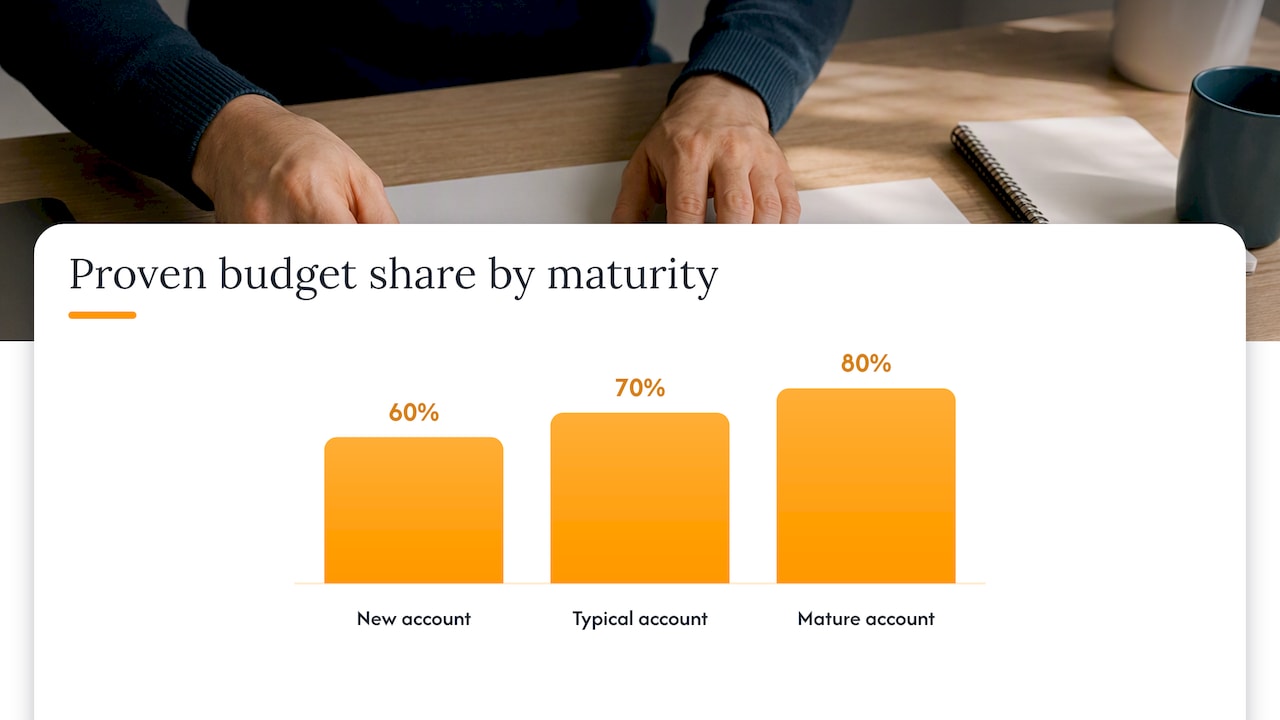
Once you know your total number, the next question is where it goes. A 70/30 split between proven campaigns and testing is a reasonable starting point for most accounts. However, the ratio should move with account maturity. A brand-new account benefits from a heavier testing allocation, closer to 60/40, because there’s no performance history yet to protect. A mature account with 12 months of conversion data can lean toward 80/20, putting more weight behind what already works.
Budget should also split by objective, not just by campaign age:
- Direct response campaigns (search, shopping) typically get the largest share since they’re closest to the sale and easiest to measure against CAC.
- Awareness and top-of-funnel campaigns (display, video, some social) get a smaller, deliberate allocation, usually justified by brand lift or assisted conversions rather than last-click ROAS.
- Retention and remarketing gets a modest but consistent slice, since it tends to produce some of the lowest CACs in the account.
Channel weighting should follow the signals in front of you rather than a fixed rule. If one channel’s CPC is climbing while conversion rate holds steady, that’s a sign of rising competition, not necessarily a reason to pull back. If CVR drops while CPC stays flat, the problem is more likely the landing page or offer than the bid strategy. Experts recommend treating allocation as dynamic, shifting dollars toward the next marginal unit of return rather than locking in a static split once a quarter.
Set a weekly cadence for reviewing these signals, but require a minimum data threshold, generally at least 100 clicks or 15 to 20 conversions per campaign, before making a reallocation call. Reacting to three days of data is how good campaigns get starved prematurely.
A mid-market account with $50,000 might spread that same logic across more campaigns, with a dedicated Performance Max line, a branded search line, and separate testing budgets for each.
Platform mechanics and spending limits: what Google Ads and major platforms actually do with your budget
Your budget on paper and your actual spend are not always the same thing, and the gap usually comes down to platform mechanics most teams never read.
Google Ads applies two hard rules worth internalizing. First, a campaign can spend up to 2 times its average daily budget on any given day. Second, you will never be billed more than 30.4 times your daily budget in a calendar month, which is Google’s way of averaging out high and low spend days. A campaign set at $100 per day could spend $200 on a Monday and $40 on a Tuesday, and still land within its monthly cap.
That math changes how you should set up budgets:
- Average daily budgets are the standard choice for always-on campaigns, since they let the platform pace spend across the month automatically.
- Shared budgets pool spend across multiple campaigns and are useful when you want flexibility between similar campaigns without managing each one’s number separately, as Google’s documentation explains.
- Campaign total budgets cap total spend over a set date range and work best for short, time-boxed promotions where front-loading or back-loading risk is acceptable in exchange for a hard ceiling, a point echoed in recent PPC budgeting guidance.
Smart Bidding adds another layer that trips up a lot of accounts. If your target CPA or target ROAS is set unrealistically tight compared to what the market will bear, the bidding algorithm will restrict spend well before your budget cap is reached. The campaign looks underfunded, but the real constraint is the efficiency target, not the dollar amount. Diagnosing this means checking your target against current market CPAs before assuming the budget itself is too small.
A few operating rules worth keeping on hand: divide monthly targets by 30.4 whenever you’re setting daily budgets for ad scheduling, favor campaign total budgets for limited-time promotions, and check your budget reports regularly for impression share lost specifically to budget rather than to rank or ad relevance.
Testing, pacing, and scaling: a repeatable reallocation process
Testing without a process turns into guesswork, and scaling without pacing turns into wasted spend. A repeatable cycle fixes both.
- Reserve a testing budget before you touch the rest of the account, typically the 30% (or more, for new accounts) set aside earlier.
- Set a minimum data threshold before judging any test, generally 100 clicks or enough conversions to reach statistical confidence, not a calendar deadline.
- Scale winners gradually, increasing budgets by 5% to 20% at a time rather than doubling overnight, and watch impression share for signs the increase is actually reaching new auctions.
- Set a rollback trigger, such as a 20% rise in CPA over a full data cycle, so you pull back automatically instead of hoping the number corrects itself.
- Diagnose before you scale, checking impression share, conversion rate, and target CPA behavior together to tell whether a flat campaign has a budget problem or a bidding problem.
Pro Tip: When a campaign looks underfunded, check your Smart Bidding target against current market CPCs first. A budget increase rarely fixes a target that was never realistic to begin with.
New campaigns and new accounts tend to cost more while the platform is still learning, so allocating roughly 20% extra budget for the first three to four weeks helps collect enough conversion data without starving the test early.
Seasonal campaigns deserve their own handling: pause with a plan to resume, and budget a short ramp-up period when they come back online rather than expecting day-one performance to match the prior peak. For B2B accounts with long consideration cycles, evaluate performance over 60 to 90 days instead of 30, since a single month often undervalues campaigns that are still moving leads through a longer pipeline.
Tools, templates, and a simple allocation worksheet you can use this week
A one-page worksheet is enough to run this entire process without specialized software. The inputs: monthly revenue goal, target ROAS, expected CLV, conversion rate, average CPC, and target number of new customers. The outputs: your monthly budget and your daily Google Ads budget.
A few tools cover the data-gathering side:
- Keyword Planner for estimating search volume and average CPC by keyword before you commit a budget.
- Reach Planner for forecasting reach and frequency on upper-funnel, awareness-oriented campaigns.
- Google Analytics for pulling actual conversion rates and CLV by channel instead of estimating blind.
Pro Tip: Run your conversion rate assumptions through a quick landing page audit before finalizing a budget. A few targeted CRO fixes can lower your required spend more than any bid adjustment will.
When setting up campaigns, decide upfront whether each one needs a daily budget, a campaign total budget, ad scheduling, or a shared budget pool, since changing this mid-campaign resets some of the platform’s learning. Review spend weekly against CPC, conversion rate, CAC, and impression share lost to budget, the four numbers that tell you fastest whether your allocation needs to move.
Agency checklist and practical examples from The Artist Evolution
Working across various accounts over many years has taught our team that budget allocation breaks down less from bad math and more from skipped steps. Our checklist:
- Set the goal (revenue, CAC, or both) before touching a platform.
- Wire up conversion tracking and confirm it’s attributing correctly before spending a dollar.
- Reserve a testing allocation from day one, not after the “proven” budget runs out.
- Build a weekly reallocation ritual instead of a quarterly one.
In one healthcare account, shifting an awareness campaign’s budget toward retargeting after confirming assisted-conversion data lowered blended CAC within a quarter. Readers building out a PMax strategy of their own can start with our guide to steering Performance Max with signals and exclusions.
Using historical performance data to inform budget shifts
Your account’s own history is the most reliable input for deciding where next month’s budget should go, more reliable than industry benchmarks or a competitor’s reported numbers. Pull at least 90 days of data before making a significant reallocation, since shorter windows tend to be noisy, particularly for accounts with longer sales cycles.
Look specifically at trends in CPA, conversion rate, and CLV by campaign rather than account-wide averages, since a strong overall number can hide one campaign quietly losing money. A campaign whose CPA has crept up gradually over eight weeks is telling a different story than one that spiked for three days during a competitor’s promotion.
Seasonality shows up clearly in historical data if you look at year-over-year or period-over-period patterns rather than just the trailing 30 days. A campaign that looks like it’s declining might simply be following the same dip it took the previous year, which argues for holding budget steady rather than cutting it. Build a simple log of monthly CPA, conversion rate, and spend by campaign, and revisit it before every reallocation decision rather than relying on memory or a single dashboard snapshot.
Adjusting budget allocation for audience targeting and segmentation
Not every audience segment deserves the same budget weight, and lumping them together in one campaign hides which ones are actually earning their spend. Segmenting by intent, past purchase behavior, or lifecycle stage lets you see CAC and CLV differences that a blended account average will never show.
New customer acquisition audiences typically need a higher CAC tolerance since they’re earning no retention value yet, while remarketing and past-purchaser segments can often run at a tighter CAC because they convert at a higher rate. Splitting budget accordingly, rather than spreading evenly, usually produces a better blended return.
First-party data, including CRM lists and offline conversion imports, improves this process by training bidding systems on your actual highest-value customers rather than generic platform signals. Using Customer Match exclusions to keep acquisition budgets focused on genuinely new customers, rather than people who already convert through other channels, protects that portion of the budget from being spent on audiences who were going to buy anyway.
Tracking and attribution impact on budget decisions
A budget decision is only as good as the attribution model behind the data that drove it. Last-click attribution tends to overcredit bottom-funnel channels like branded search and undercredit the awareness campaigns that introduced the customer earlier in the journey, which can push budget toward the wrong line items over time.
Confirm conversion tracking is firing correctly before reallocating anything. It sounds basic, but a mistagged conversion action or a broken offline import can quietly distort weeks of “performance” data and send budget toward a campaign that isn’t actually winning.

Offline conversion imports and CRM-based attribution give a fuller picture for businesses with longer or more complex sales processes, connecting ad spend to closed revenue rather than stopping at a lead form submission. Review your attribution setup at least quarterly, since platform defaults and available models change, and an outdated setting can quietly skew every allocation decision made on top of it.
What we’d prioritize first if the budget were tight
If we only had the budget for one change this month, it would be fixing conversion tracking and attribution before touching any spend numbers. Most misallocated budgets we’ve reviewed weren’t wrong because of bad math, they were wrong because the data feeding the math was broken. Confirm your tracking first, then let the formulas do their job.
— Derek
How we help with PPC budget planning and management
Running these formulas, platform rules, and weekly reallocation rituals on top of everything else on a marketing calendar is a lot to carry alone, and that’s exactly where managed support earns its place. Through our Pay-Per-Click Management Agency service, our team handles the budget calculations, the daily pacing against Google’s spending rules, and the weekly signal checks that decide where your dollars move next.

If your team would rather hand off the spreadsheet and the platform mechanics and focus on the business decisions, reach out through our Pay-Per-Click Management Agency page to see how we’d structure your account.
FAQ
What does PPC mean in finance?
In a marketing and finance context, PPC stands for pay-per-click, an advertising model where you pay only when someone clicks your ad rather than for impressions or placement. It’s a variable cost tied directly to measurable clicks, which is why it’s budgeted separately from flat media buys.
What is the 70/20/10 rule for marketing budget?
It’s a broader marketing budgeting principle, related to but distinct from the 70/30 proven-versus-testing split commonly used specifically for PPC allocation.
What is a good PPC cost?
There’s no single “good” cost since average CPCs vary widely by industry, platform, and competition level. A more useful measure is whether your CPC and resulting CAC fit inside your target ROAS or acceptable acquisition cost based on your own margins and CLV, calculated using the revenue-goal or conversion-goal formulas above.
What does PPC stand for?
PPC stands for pay-per-click, a form of online advertising where advertisers pay a fee each time their ad is clicked. It covers platforms like Google Ads and paid social advertising, and it’s the basis for the budgeting formulas and allocation frameworks covered throughout this guide.
Sources
- About spending limits – Google Ads Help
- About average daily budgets – Google Ads Help
- PPC budgeting in 2026: When to adjust, scale, and optimize with data – Search Engine Land
- PPC budget strategies for all campaign stages – Search Engine Journal
- How To Set a PPC Budget: Tips for Pay-Per-Click Budgeting (2026) – Shopify