
A CRM implementation roadmap is a phased, goals-first plan that ties system configuration to measurable adoption gates at 30, 60, and 90 days. It works because it treats change management and technical setup as equal priorities, not sequential afterthoughts. Start with three moves this week: define the specific business goal the CRM must hit, name a single project owner, and run a readiness check on your current data and workflows.
TL;DR:
- Most CRM projects fail due to skipping critical checkpoints, data problems, or scope creep, leading to delays and unmet objectives.
- Setting measurable goals, defining scope carefully, and establishing clear ownership in governance are essential for a successful implementation.
- Thorough data auditing, mapping, and pilot migration help prevent trust issues and reporting inaccuracies at launch.
- Prioritizing real process alignment over out-of-the-box templates and ensuring dedicated training improves user adoption rates.
- Continuous reviews at 30, 60, and 90 days, combined with strong governance and scope control, sustain project success beyond initial rollout.
Table of Contents
- What Does a CRM Implementation Roadmap Look Like?
- Step 1: What Goals and Scope Should Drive Discovery?
- Step 2: Who Owns Governance and the RACI?
- Step 3: How Do You Handle Data Audit, Mapping, and Migration?
- Step 4: What Should You Configure and Integrate First?
- Step 5: What Testing and UAT Standards Should You Set?
- Step 6: How Do You Train Users and Drive Real Adoption?
- Step 7: What Does a Safe Go-Live and Hypercare Plan Include?
- Step 8: How Do You Run 30/60/90 Reviews and Keep Improving?
- What Risks Should You Watch and How Do You Control Scope?
- How an Agency Approaches CRM Rollouts
- Why Most CRM Roadmaps Undersell the Human Side
- When It Makes Sense to Bring in an Agency
- Sources
- FAQ
What Does a CRM Implementation Roadmap Look Like?
A working roadmap moves through eight phases, each with a clear deliverable and a checkpoint before the next one starts. Most CRM projects that stall do so because a team skips a checkpoint to save time, then pays for it during go-live.
Here’s the sequence, phase by phase:
- Discovery — lock goals, scope, and a readiness baseline.
- Governance — staff the project team and build the RACI.
- Data — audit, map, clean, and pilot-migrate records.
- Configuration — build pipelines, fields, and core integrations.
- Testing — run UAT against defined pass criteria.
- Training — deliver role-based sessions and activate champions.
- Go-live — execute cutover with a go/no-go checklist and hypercare.
- Post-launch — run 30/60/90 reviews and feed a Phase 2 backlog.
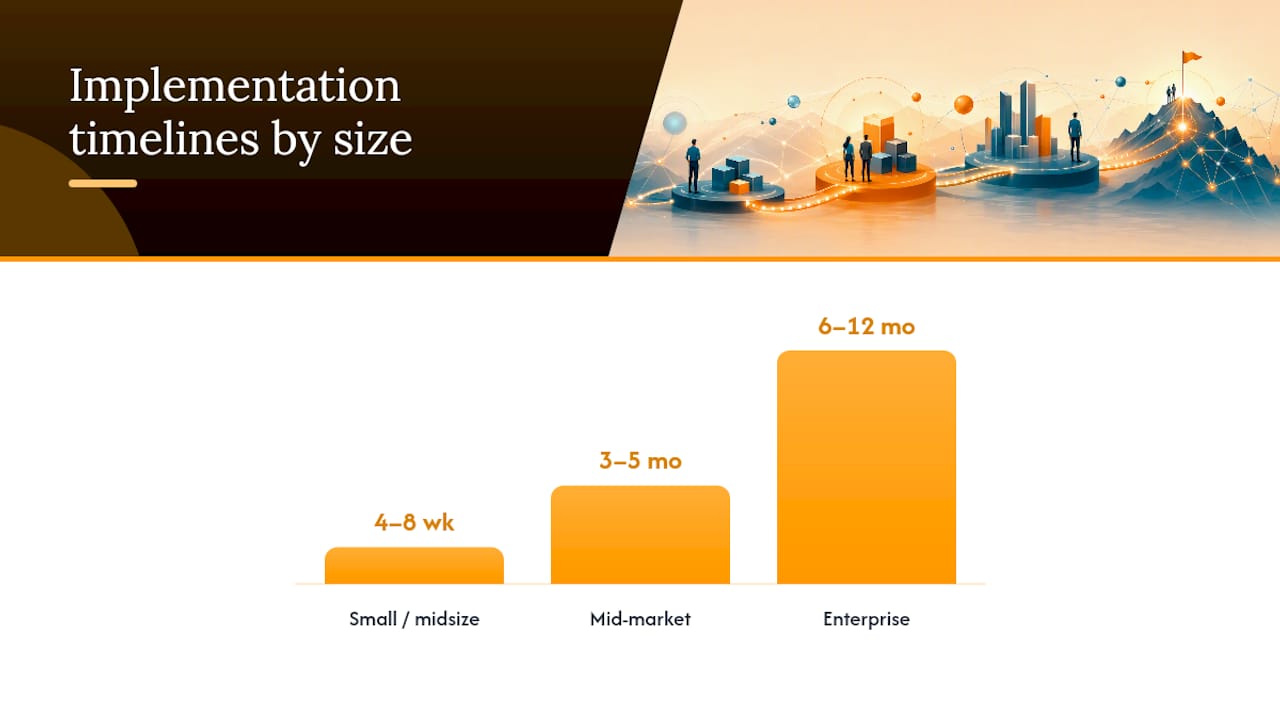
Timelines vary sharply by organization size. Small and midsize businesses typically complete implementation in 4 to 8 weeks, mid-market companies need 3 to 5 months, and enterprise rollouts with multiple business units or legacy integrations often run 6 to 12 months. Build in buffer regardless of size. A large share of CRM projects initially miss their objectives and blow past their projected timelines, usually because scope or data problems surface mid-project rather than during discovery.
Your first-week actions: write down the one metric this CRM must move (not five), pull your current contact and deal export to eyeball data quality, and schedule a 30-minute kickoff with whoever will own the decisions.
Step 1: What Goals and Scope Should Drive Discovery?
Discovery fails when teams jump straight to picking fields and pipelines before agreeing on what success looks like. A CRM implementation plan without a measurable goal turns into a system nobody trusts by month three.
Set goals that can actually be tracked in the CRM itself:
- Pipeline conversion rate by stage (baseline it before you touch configuration).
- Time-to-first-value for new leads or cases, measured in days.
- Customer satisfaction (CSAT) or resolution time for service teams.
- Data accuracy rate, such as percentage of records with complete required fields.
Scope Phase 1 tightly. Decide which teams go live first (sales usually leads, service and marketing often follow in Phase 2), which workflows are in scope, and which data objects actually migrate versus get archived. Trying to migrate every historical record and every department at once is the single fastest way to blow a timeline.
Before configuration starts, run a readiness checklist: confirm executive sponsorship is real (not just a signature), audit current data volume and duplicate rates, and interview five to eight frontline users about their actual daily workflow. That last step matters more than most teams expect. It’s where you discover the spreadsheet workaround nobody mentioned in the requirements meeting.
Step 2: Who Owns Governance and the RACI?
CRM projects don’t fail from lack of effort. They fail from unclear ownership, where three people assume someone else is handling data cleanup and nobody is.
Staff these roles before writing a single configuration ticket:
- Project lead — owns the timeline, the budget, and the go/no-go call.
- Data lead — owns migration accuracy and field mapping decisions.
- Integrator (internal admin or vendor) — owns technical configuration and API connections.
- Department champions — one per team, owns user feedback and daily troubleshooting.
- Executive sponsor — removes blockers and protects the project from competing priorities.
Populate your RACI (Responsible, Accountable, Consulted, Informed) with actual names, not job titles. A RACI that lists “Marketing” instead of “Sarah Chen” is a RACI nobody feels accountable to, and ownership erodes fast once the initial excitement wears off.
For the first 90 days, run a weekly 30-minute steering check-in to refresh the RACI and clear blockers, plus a biweekly sponsor update that’s short enough to actually get read. Active, visible sponsorship in this window consistently correlates with stronger project outcomes than sponsors who sign off once and disappear.
Pro Tip: Put the RACI in the same document as your project timeline, not a separate file. Teams check timelines constantly; they forget standalone RACI docs exist within two weeks.
Step 3: How Do You Handle Data Audit, Mapping, and Migration?
Bad data migration is the quiet killer of CRM projects. Teams that skip a proper audit end up importing years of duplicates, dead leads, and mistyped fields, then wonder why nobody trusts the reports.
Run this sequence in order, not in parallel:
- Master export every source system’s records first, before any cleanup begins.
- Deduplicate using a matching rule (email plus company name works for most B2B datasets).
- Map fields one by one against the new CRM’s schema, documenting transformation rules for anything that doesn’t map cleanly (date formats, picklist values, currency fields).
- Pilot migrate a sample of 200 to 500 records first, never the full dataset.
- Validate the pilot against source records manually, checking required fields, relationship links, and any custom calculations.
A documented master mapping combined with a pilot migration catches transformation errors and stale records before they ever touch your production instance. This step alone prevents the most common go-live complaint: “the numbers don’t match what we had before.”
Budget more time here than you think you need. Data work routinely eats 30 to 40% of total implementation time on projects with multiple legacy sources, even though it rarely shows up as its own line item in the original plan.
Step 4: What Should You Configure and Integrate First?
Default templates are the enemy of adoption. A CRM configured around out-of-the-box pipeline stages instead of your actual sales or service process gets ignored within a month, because reps route around a tool that doesn’t match reality.
Configuration priorities that hold up:
- Build pipeline stages that mirror your real sales or service process, not the vendor’s generic template.
- Add a custom field only if it feeds a specific report or triggers a specific workflow. If you can’t name the report, don’t build the field.
- Integrate email and calendar on day one; these drive daily usage more than any other connection, and aligning this with marketing automation is critical as shown in this marketing automation checklist.
- Connect your marketing automation platform next, since campaign attribution depends on it (see these marketing automation workflow templates for structuring the handoff between systems).
- Delay lower-priority integrations (accounting, e-signature, niche tools) to Phase 2 unless a specific workflow blocks without them.
Integration drift happens when teams keep adding connections mid-project to solve one-off requests. Every integration request should route through the same change-control process governing scope, not get bolted on because someone asked nicely in a Slack message.
Step 5: What Testing and UAT Standards Should You Set?
Skipping structured testing is how teams discover broken automation rules in front of customers instead of in a sandbox. Run every layer before scheduling a go-live date.
- Unit testing — verify individual fields, formulas, and automation rules function correctly in isolation.
- Integration testing — confirm data flows correctly between the CRM and connected systems (email, marketing automation, billing).
- End-to-end testing — walk a full record through its entire lifecycle, lead to close or case to resolution.
- Performance testing — check load times and bulk-action speed under realistic data volumes.
- Security testing — verify permission sets and field-level security match your access policy.
- User acceptance testing (UAT) — have actual end users run their real daily tasks in the new system.
Set a UAT pass threshold before testing starts, not after. Failing tests should hold the line on go-live rather than get waved through under deadline pressure. Structure test scripts by role (rep, manager, service agent), and log every pass or fail with a timestamp and owner.
Step 6: How Do You Train Users and Drive Real Adoption?
Training that consists of one long webinar produces low retention and lower usage. Role-based training, delivered in small chunks close to go-live, performs far better.
The recipe that works across most rollouts:
- A 20-minute overview video for the “why” and the big-picture workflow.
- A 45-minute hands-on session in a sandbox environment, specific to each role.
- A one-page reference sheet covering the five tasks that role does most often.
- Weekly office hours for the first month, dropping to biweekly after that.
- A refresher session at day 45, once users have real questions instead of hypothetical ones.
Build a champion network of one to three power users per department who field questions before they escalate to the project team. Change-management frameworks like Prosci ADKAR and Kotter’s 8-step model exist precisely because technical rollout and human adoption are separate problems requiring separate plans.
Adoption KPIs to track at Day 30, 60, and 90: login frequency, required-field completion rate, and pipeline data hygiene. Track these alongside duplicate rates and activity counts for a balanced read on both usage and data quality, not just logins.
Step 7: What Does a Safe Go-Live and Hypercare Plan Include?
Cutover day should never be a surprise. Run through a go/no-go checklist 48 hours before launch, and be willing to push the date if it fails.
Check these before you flip the switch:
- Final data migration validated against the pilot results, with no unresolved discrepancies.
- UAT pass rate confirmed at or above your threshold, with all blocking issues resolved.
- Champions and support staff briefed on escalation paths for launch day.
- Rollback plan documented, including the specific data or workflow triggers that would activate it.
Once live, run a hypercare period of two to four weeks. Set up a single issue-intake channel, assign an on-call owner each day, and hold a 15-minute daily check-in with the project team to triage anything urgent. Define rollback conditions in advance, such as a critical automation failure or data corruption affecting a full team, and keep a temporary fallback workflow (even a shared spreadsheet) ready so daily operations don’t stall while a fix ships.
Step 8: How Do You Run 30/60/90 Reviews and Keep Improving?
The work doesn’t end at go-live. It shifts from building the system to proving it delivers, and that requires a formal review cadence rather than an assumption that adoption will simply happen.
| Checkpoint | What to measure | Who signs off |
|---|---|---|
| Day 30 | Login frequency, required-field completion, early user feedback | Project lead + department champions |
| Day 60 | Pipeline hygiene, duplicate rate, workflow automation accuracy | Project lead + executive sponsor |
| Day 90 | Progress against the original Phase 1 goal (conversion, time-to-value, CSAT) | Executive sponsor |
At each checkpoint, collect user feedback through a short survey and office-hours notes, then sort issues into a prioritized Phase 2 backlog. Weight items by how many users hit the friction versus how complex the fix is; a small annoyance affecting everyone often outranks a big request affecting three people.
Beyond 90 days, shift governance to a monthly cadence: a standing review of adoption dashboards, a light quarterly audit of data quality, and a rolling backlog groomed alongside your marketing or sales leadership. Tools built for ongoing reporting dashboards make this cadence far easier to sustain than pulling manual exports every month.
What Risks Should You Watch and How Do You Control Scope?
Three failure modes account for most stalled CRM projects: scope creep, weak or invisible sponsorship, and poor data quality carried into migration. Each has a specific, named mitigation, not just “communicate better.”
- Scope creep — the top reason projects miss deadlines. Fix it with a formal change-control intake form (requestor, description, business impact, effort estimate, recommendation) reviewed by the project lead within three business days.
- Weak sponsorship — fix it with the biweekly sponsor update described earlier; passive sponsors who never comment publicly signal low priority to the whole team.
- Poor data quality — fix it with the master export and pilot migration process, never a single bulk import.
Keep the RACI current and reviewed weekly. Task drift almost always traces back to a RACI nobody updated after the second week.
How an Agency Approaches CRM Rollouts
Marketing agencies that manage CRM projects treat the system as a campaign engine, not just a database. Every pipeline stage, custom field, and dashboard gets built to answer one question: which campaigns and channels are actually driving pipeline and revenue.
At Theartistevolution, that means configuration work stays tied to campaign management frameworks from day one, so sales and marketing report from the same numbers instead of arguing about whose spreadsheet is right. Typical agency responsibilities on a CRM project include capturing requirements from both marketing and sales stakeholders, building the integrations between the CRM and ad platforms or email tools, designing the reporting dashboards leadership actually uses, and running the adoption campaign that gets reps and account managers to log in daily instead of once a month.
Why Most CRM Roadmaps Undersell the Human Side
The technical parts of a CRM rollout get all the attention in vendor demos: pipelines, automations, dashboards. The part that actually determines whether the project succeeds is whether real people change how they work, and most roadmaps treat that as an afterthought instead of a parallel workstream with its own milestones.
The evidence backs a specific correction to conventional advice: teams that build adoption gates (30/60/90 reviews with named sign-off owners) into the plan from the start outperform teams that bolt on training at the end. That’s not a nuance. It’s a structural difference in how the project is designed.
Where most guidance falls short is treating change management as a training checklist rather than a governance function. A RACI with real names, a sponsor who posts visible updates, and a change-control form that takes three days to review, not three weeks, do more for adoption than a slicker onboarding video ever will.
If you take one thing from this roadmap, prioritize governance discipline over configuration polish. A perfectly built pipeline that nobody logs into is worth less than a plain one that the whole team actually uses.
— Derek
When It Makes Sense to Bring in an Agency
Running this roadmap internally works well when you have a dedicated project lead, clean-ish data, and a team that can absorb training without dropping other priorities. It gets harder when your CRM needs to talk to campaign platforms, ad accounts, and reporting dashboards that your internal team has never configured before.
Some agencies cover requirements capture across marketing and sales, integration work between your CRM and ad or email platforms, dashboard design tied to campaign KPIs, and adoption programs designed specifically for your team’s workflow rather than templated content.
If your CRM rollout needs to prove marketing ROI, not just track contacts, Theartistevolution’s campaign management service is built to configure that connection from day one. For teams still finalizing scope and goals before committing to a build, a marketing assessment is a practical way to pressure-test readiness before the project clock starts. Reach out to scope your rollout and get a straight answer on timeline and cost before you sign anything.
Sources
For deeper detail on the steps covered here, these sources informed the roadmap’s timeline estimates, testing standards, and governance recommendations:
- CRM deployment: A step-by-step process for growing teams (HubSpot)
- CRM implementation plan (Liboiron)
FAQ
How Do I Implement a CRM Step by Step?
Start with discovery to lock goals and scope, then build governance and a RACI, migrate and validate data, configure pipelines and integrations, run UAT against a pass threshold, train by role, go live with a hypercare period, and review adoption at 30, 60, and 90 days.
What Are the Four Pillars of a CRM?
Most frameworks describe the four pillars as sales, marketing, customer service, and analytics, unified around a shared customer record that all four teams can see and update.
What Are the 7 C’s of CRM?
Definitions vary across sources, but a common version covers customer, company, competitors, capabilities, collaborators, change, and cost, framing CRM strategy around the full business ecosystem rather than the tool alone.
Will CRM Be Replaced by AI?
AI is being layered into CRM platforms for scoring, summarization, and automation rather than replacing the underlying system. The roadmap and governance practices in this guide still apply regardless of how much AI is inside the tool, and tools like AI-driven marketing automation are best treated as an optimization layer added after adoption is solid.
How Long Does a Typical CRM Rollout Take?
Small and midsize businesses generally finish in 4 to 8 weeks, mid-market companies need 3 to 5 months, and enterprise rollouts with complex integrations often take 6 to 12 months.