
A marketing automation workflow is a rules-based sequence that triggers marketing actions automatically when a customer does something specific, like signing up, abandoning a cart, or going quiet for 90 days. Build these three first: a welcome series, a cart or demo abandonment recovery flow, and a post-purchase or onboarding sequence. Together they touch the three moments most likely to convert or churn a customer, and they alone can generate significant revenue while your team learns the platform.
Here’s your starting shortlist, in priority order:
- Welcome series — triggered the moment someone subscribes or creates an account
- Abandoned cart or demo follow-up — triggered by an incomplete checkout or unbooked demo request
- Post-purchase/onboarding — triggered immediately after a sale or signup to reduce buyer’s remorse and drive activation
This week, map the trigger and first three messages for whichever one of these three touches the most customers right now. That’s the workflow to build before any other.
Key Takeaways
Marketing automation workflows work because they combine a clear trigger, branching logic, and measurable exits to respond to customer behavior faster and more consistently than manual outreach ever can.
| Point | Details |
|---|---|
| Start with three workflows | Welcome series, cart or demo abandonment, and post-purchase nurture cover the highest-impact moments first. |
| Every workflow needs five parts | Trigger, condition, action, delay, and exit are non-negotiable for a workflow to run reliably. |
| Suppression prevents fatigue | Priority rules like cart recovery over browse abandonment stop overlapping sends from annoying customers. |
| Match KPIs to workflow type | Track recovery rate for cart flows, MQL-to-opportunity for nurture, and conversion rate for welcome series. |
| Agencies deliver working automations fast | Theartistevolution pairs an assessment with one built, tested workflow as its first client deliverable. |
Table of Contents
- What Is a Marketing Automation Workflow, and Why Build One?
- Core Components Every Workflow Needs
- Nine Marketing Automation Examples You Can Copy Today
- How to Build and Launch a Workflow Step by Step
- Choosing Automation Tools and Integration Patterns
- Measuring Workflow Performance and Running Tests
- Scaling Workflows Without Losing Control
- Sources
What Is a Marketing Automation Workflow, and Why Build One?
A marketing automation workflow is an event-triggered sequence of marketing actions governed by rules you set once and let run. Someone abandons a cart, and three emails go out over five days without a human touching send. Someone downloads a whitepaper, and a lead score updates while a nurture sequence begins in the background. The mechanics are simple. The payoff is that your marketing responds to behavior in real time instead of waiting for someone to notice.
The practical case for automating these moments comes down to three things: speed, relevance, and scale. A workflow reacts within minutes of a trigger event, something no manual send schedule can match. It also lets you personalize at a level that would take a full-time employee to replicate by hand across thousands of contacts. Cross-channel orchestration, which stitches together email, SMS, push, and web behavior into one coordinated journey, is where most of the retention gains show up, because customers respond on whatever channel they actually check.
Not every marketing moment deserves automation, though. If a moment happens rarely, involves fewer than a few dozen contacts a month, or requires judgment calls that don’t reduce to simple rules, keep it manual. Automate when you have volume, a repeatable trigger, and a measurable goal at the other end. A one-off partnership announcement doesn’t need a workflow. A recurring cart abandonment problem does.
Core Components Every Workflow Needs
Every workflow you build, regardless of platform, breaks down into the same handful of parts. Get sloppy with any one of them and the whole sequence misfires.
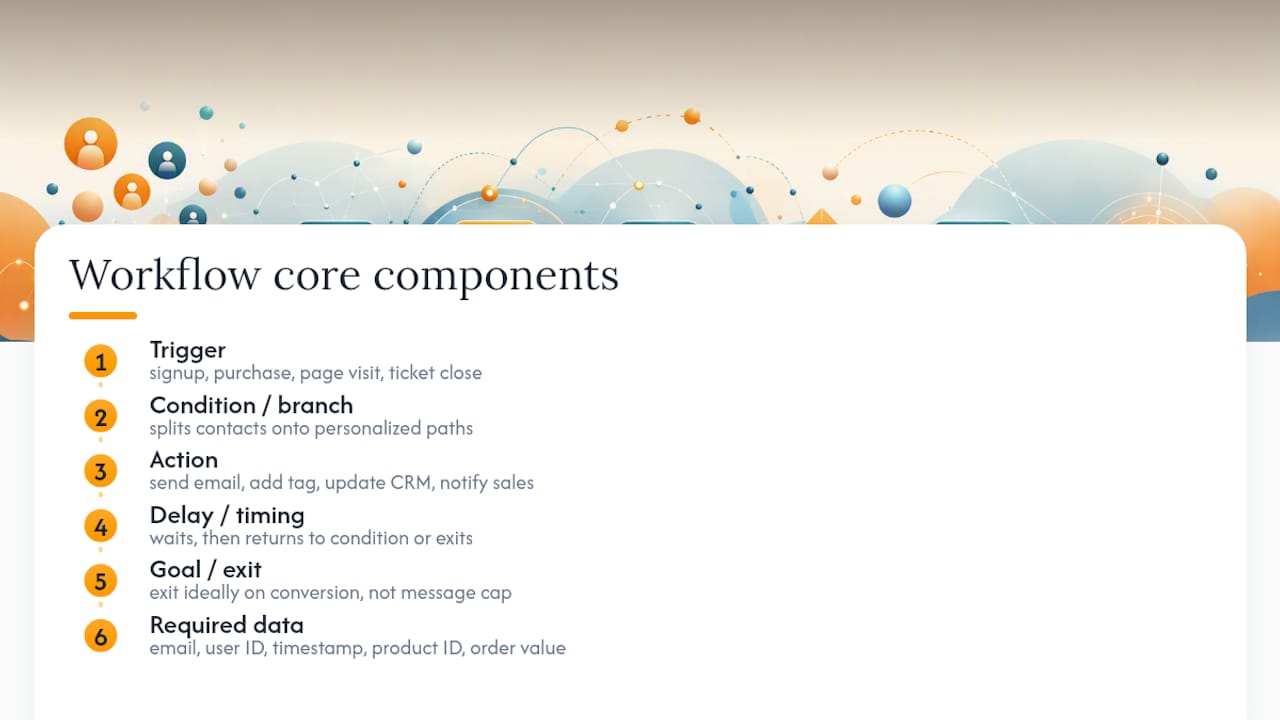
Trigger: the event that starts the workflow. A signup, a purchase, a page visit, a support ticket closing.
Condition or branch: a rule that splits contacts down different paths. Did they open the first email? Did they add a second item to cart? Branches are what make a workflow feel personalized instead of generic.
Action: what actually happens. Send an email, add a tag, update a CRM field, notify a sales rep, apply a discount code.
Delay/timing: how long the workflow waits between actions. Too short feels like spam. Too long loses momentum.
Goal/exit: the condition that pulls someone out of the workflow, ideally because they converted, not because they hit message ten.
The flow direction is always the same shape: trigger leads to condition, condition leads to action, action leads to delay, delay leads back to condition or out through exit. Before building anything, confirm you can capture the minimum data fields the workflow needs: email address, a unique user ID, the event timestamp, product ID where relevant, and order value if revenue tracking matters. Missing even one of these breaks personalization or reporting downstream.
Nine Marketing Automation Examples You Can Copy Today
These templates cover the moments that account for most of the automation value in a typical funnel. Each one lists the trigger, the step sequence, timing, a sample message angle, and the KPI that tells you whether it’s working. Adapt the specifics to your product, but the skeleton holds across most industries.
1. Welcome series
Trigger: new email signup or account creation.
Steps: Day 0, brand introduction and set expectations. Day 2, best content or top product picks. Day 5, a light call to action (browse, book a call, complete a profile).
Sample subject line: “You’re in. Here’s where to start.”
KPI: subscriber-to-customer conversion rate.
2. Abandoned cart / demo follow-up
Trigger: checkout started but not completed, or a demo request form abandoned mid-fill.
Steps: 1 hour after abandonment, a reminder. 24 hours later, address a likely objection (shipping cost, pricing question). 72 hours later, a final nudge, sometimes with an incentive.
Sample subject line: “Still thinking it over?”
KPI: recovery rate and revenue per recipient.

3. Post-purchase nurture
Trigger: order confirmation.
Steps: immediate order confirmation and delivery estimate. Day 3, usage tips or setup guidance. Day 14, request a review. Day 30, cross-sell relevant products.
KPI: repeat purchase rate within 60 days.
4. Onboarding sequence (SaaS)
Trigger: account activation.
Steps: Day 0, core setup checklist. Day 3, highlight the one feature tied to retention. Day 7, check-in with a human touchpoint if usage is low.
KPI: activation rate and time-to-first-value.
5. Browse abandonment
Trigger: product page view with no add-to-cart, typically within a 24 to 48 hour window.
Steps: single follow-up email or retargeting ad showing the viewed item plus similar options.
KPI: click-through rate and return visit rate.
6. Win-back / re-engagement
Trigger: no purchase or login for 60 to 90 days.
Steps: “we miss you” message, followed by a survey or incentive, then a final sunset email before suppressing the contact from regular sends.
KPI: reactivation rate.
7. B2B lead nurture
Trigger: content download, webinar registration, or a lead score threshold.
Steps: educational content over two weeks, then a case study, then a direct sales invitation once the lead score crosses a defined line.
KPI: MQL-to-opportunity conversion rate.
8. Upsell / cross-sell
Trigger: a purchase or subscription tier reaching a usage milestone.
Steps: highlight the upgrade path or complementary product tied to demonstrated usage, not just tenure.
KPI: expansion revenue per account.
9. Referral request
Trigger: a satisfaction signal, such as a high support rating or a completed second purchase.
Steps: ask for a referral with a simple incentive, then a reminder if unopened after a week.
KPI: referral conversion rate.
Industry variation matters here. Ecommerce brands lean hardest on cart recovery and browse abandonment; one back-in-stock alert example produced a large jump in click engagement for a retailer using timely restock notifications. SaaS companies get the most value from onboarding and upsell flows, since activation and expansion revenue drive their unit economics. B2B teams should weight lead nurture and drip campaigns tied to lead scoring more heavily than transactional flows, since sales cycles run longer and involve more touchpoints before a deal closes. For a deeper breakdown of nurture sequencing specifically, this guide to lead nurturing strategy is worth a read.
Pro Tip: Build suppression logic into every template before launch, not after. A customer who just bought shouldn’t land in a browse abandonment flow for the same product a day later. Overlap like that is the fastest way to burn trust and inflate unsubscribe rates.
How to Build and Launch a Workflow Step by Step
Building a reliable workflow follows a predictable arc: plan, map, build, test, activate, monitor.
Start by defining a single objective for the workflow. “One workflow, one objective” keeps the logic clean and the reporting readable. Pick the trigger event, then map every branch on paper or a whiteboard before touching your platform. Draw the exits too. A workflow with no exit condition just keeps sending until someone unsubscribes out of frustration.
Once the map is solid, build the content and any A/B variants, then configure timing and exit rules inside your platform. This is where most of the real work happens, since copy and timing decisions are what separate a workflow that converts from one that gets ignored.
Before you activate anything, run a QA pass. Send test versions to a staging list or your own team. Walk through every branch manually using test accounts that represent each condition path. Confirm suppression rules actually suppress; this is the single most common failure point, and it’s invisible until a customer complains about getting the wrong email.
Watch for these red flags once live: messaging overlap that causes fatigue, workflows with no clear exit so contacts loop indefinitely, broken data feeds that stall a trigger silently, and lead routing that drops hot prospects into a queue nobody checks. Any one of these can quietly erode a workflow’s performance for weeks before someone notices the drop in conversion.
Choosing Automation Tools and Integration Patterns
The right platform depends less on brand name and more on whether it has the specific capabilities your workflows need. Look for:
- A visual flow builder that shows branching logic without requiring code
- An event API or webhook support so external triggers (cart events, product usage) can start a workflow
- Native CRM sync so lead and customer data stays consistent across systems
- Multi-channel support spanning email, SMS, and push, not just email
- Granular segment and suppression controls
- A testing sandbox to preview and QA before anything goes live
Common integration patterns look like this: an ecommerce cart event fires a webhook that starts a recovery workflow; a CRM lead score crossing a threshold triggers a nurture sequence; a product usage event kicks off a post-purchase or upsell flow. Theartistevolution’s marketing technology services exist largely to solve exactly this kind of integration mapping for teams without a dedicated ops person.
Cost and scale considerations creep up fast. Most platforms price by contact volume or message send tiers, and API rate limits can throttle a fast-growing list. If you’re managing dozens of interconnected workflows across multiple channels, that’s usually the signal to move to a more capable orchestration platform before hitting a wall.
Measuring Workflow Performance and Running Tests
Different workflows call for different KPIs. A welcome series lives or dies on subscriber-to-customer conversion. Cart recovery flows get judged on recovery rate and revenue per recipient. Lead nurture succeeds or fails on MQL-to-opportunity rate. Across all of them, track open rate, click rate, unsubscribe rate, and time to conversion as your baseline health metrics.
When testing, change one variable at a time, whether that’s subject line, timing, or offer, and let each test run long enough to reach a meaningful sample size before calling a winner. Compare against your workflow’s baseline performance from before the change, not against an industry average, since your own historical data is the fairest yardstick. Attribution gets murky when workflows overlap with other campaigns, so isolate a workflow’s ROI by comparing converted contacts inside the flow against a similar cohort that never entered it.
Scaling Workflows Without Losing Control
As your workflow count grows past a handful, governance stops being optional. Use a consistent naming convention, something like [Channel]_[Trigger]_[Version], so anyone on the team can identify a flow’s purpose at a glance. Version your assets when you update copy or logic, and keep an older version archived rather than overwritten, in case you need to roll back.
Priority rules prevent overlap chaos. A common, effective setup: cart recovery takes precedence over browse abandonment, and post-purchase flows suppress promotional sends for a set number of days after a sale.
- Maintain a single source of truth for opt-outs across every channel
- Cap send frequency per contact per week, regardless of how many workflows they qualify for
- Log consent records at the point of capture, not after the fact
- Audit suppression logic every quarter as new workflows get added
Pro Tip: Keep a master workflow inventory spreadsheet listing every active flow, its trigger, and its suppression dependencies. It sounds unglamorous, but it’s the single fastest way to catch overlap before a customer does.
A Real Agency Example: LinkedIn Lead Generation
Theartistevolution built a LinkedIn lead generation workflow for an expanding agency client that needed a repeatable way to fill its sales pipeline. The workflow triggered on qualified LinkedIn engagement, routed prospects through a scored nurture sequence, and handed off sales-ready leads directly to the client’s team once engagement thresholds were met. The result was a measurable, sustained increase in qualified lead volume without adding headcount. The lesson for readers building a similar flow: define your handoff criteria to sales before you launch, not after the leads start arriving.
Should You Hire an Agency or Build Workflows In-House?
In-house teams keep control and institutional knowledge but often lack the bandwidth for cross-channel complexity. Agencies bring speed and platform expertise at a cost. If you’re managing more than a few workflows across multiple channels without a dedicated marketing ops person, that’s your signal to get outside help. Start by asking for an assessment paired with one working workflow, not a full overhaul.
How Theartistevolution Builds and Manages Automation That Actually Runs
Most teams don’t need more workflow ideas. They need someone to build the trigger logic correctly, connect the data feeds, and keep the thing running without babysitting it. That’s the gap Theartistevolution closes: we deliver a working automation, not just a strategy deck.

Our first deliverable for a new automation client is straightforward: an assessment of your current customer touchpoints paired with one fully built, tested workflow you can see running within weeks, not quarters. From there, our campaign management services handle the ongoing monitoring, optimization, and reporting so your workflows keep performing as your list grows and your business changes. If your automation needs stretch into messaging and brand alignment, our brand development work makes sure every automated touchpoint sounds like you. Request a marketing assessment and we’ll show you exactly which workflow to build first and what it should be capable of within 90 days.
Sources
- Marketing Automation Workflow: Triggers, Templates, QA, and Multi-Channel Rules (2026)
- 12 marketing automation examples that work (with proof) – Dotdigital
- How to Build a Lead Scoring Model That Actually Predicts Conversions | Pecan AI