
Launch service-line search campaigns, set up HIPAA-aware conversion tracking, and build dedicated landing pages before you spend a single dollar. That three-part foundation is what separates medical practices that generate booked appointments from those that burn budget on clicks that never convert. Google Ads, known formally as a pay-per-click (PPC) advertising platform, runs on a real-time auction system where your ad appears when a patient searches for exactly what you offer — but only if your account structure, keywords, and measurement are built for healthcare, not retail.
Your immediate 3-step checklist:
- Budget sanity check. Confirm a minimum monthly ad spend before building anything. Competitive markets like orthopedics or cosmetic dermatology in major metros require meaningful daily budgets to generate enough conversion data for Google’s algorithms to optimize.
- Campaign architecture first. Launch one service-line search campaign targeting your highest-revenue procedure or most-searched condition. Do not launch everything at once.
- Conversion tracking before spending. Install Google Tag Manager, configure GA4, and verify that phone calls and booking-confirmation page views are firing as conversion events. Spending without tracking is guessing.
If you prefer a managed setup, a marketing assessment from Theartistevolution gives you a clear picture of where your current digital presence stands before a single campaign goes live.
Key Takeaways
Running Google Ads for doctors produces measurable patient acquisition results when campaigns are built around service lines, HIPAA-aware tracking, and dedicated landing pages — not adapted from retail templates.
| Point | Details |
|---|---|
| Structure by service line | One campaign per major procedure or specialty; 3–5 ad groups per campaign improves Quality Score and lowers CPC. |
| Track booked appointments, not clicks | Configure phone call, booking confirmation, and form submission conversions before spending any budget. |
| HIPAA compliance is your responsibility | Google Ads is not HIPAA compliant by default; server-side tagging and limited form fields are required to avoid PHI exposure. |
| Expect a 60–90 day learning curve | Withhold major structural changes in the first 30 days; switch to conversion-based bidding only after reaching 30+ monthly conversions. |
| Theartistevolution manages the full setup | From audit and server-side tracking to campaign builds and ongoing optimization, Theartistevolution handles the entire PPC workflow for medical practices. |
Table of Contents
- How should you structure Google Ads campaigns for a medical practice?
- What keywords should doctors target in Google Ads?
- How do you write compliant, high-converting ad copy for healthcare?
- What does a high-converting landing page look like for a medical practice?
- How should you set geo-targeting, bidding, and budgets for clinic campaigns?
- How do you track booked appointments safely and measure what matters?
- HIPAA and ad-platform compliance checklist for U.S. practices
- What mistakes do clinics make with Google Ads, and how do you fix them?
- Ready-to-use campaign templates by specialty
- What should you report to practice owners, and how long do results take?
- Results clinics achieve with a structured Google Ads approach
- When should a practice run its own ads vs. hire an agency?
- Theartistevolution builds compliant, results-driven Google Ads for medical practices
- Primary sources and further reading
- Sources
How should you structure Google Ads campaigns for a medical practice?
Campaign architecture is the single biggest lever in PPC advertising for healthcare. A one-campaign-fits-all account makes it nearly impossible to control spend by service line, read performance clearly, or optimize bids toward the procedures that actually drive revenue.
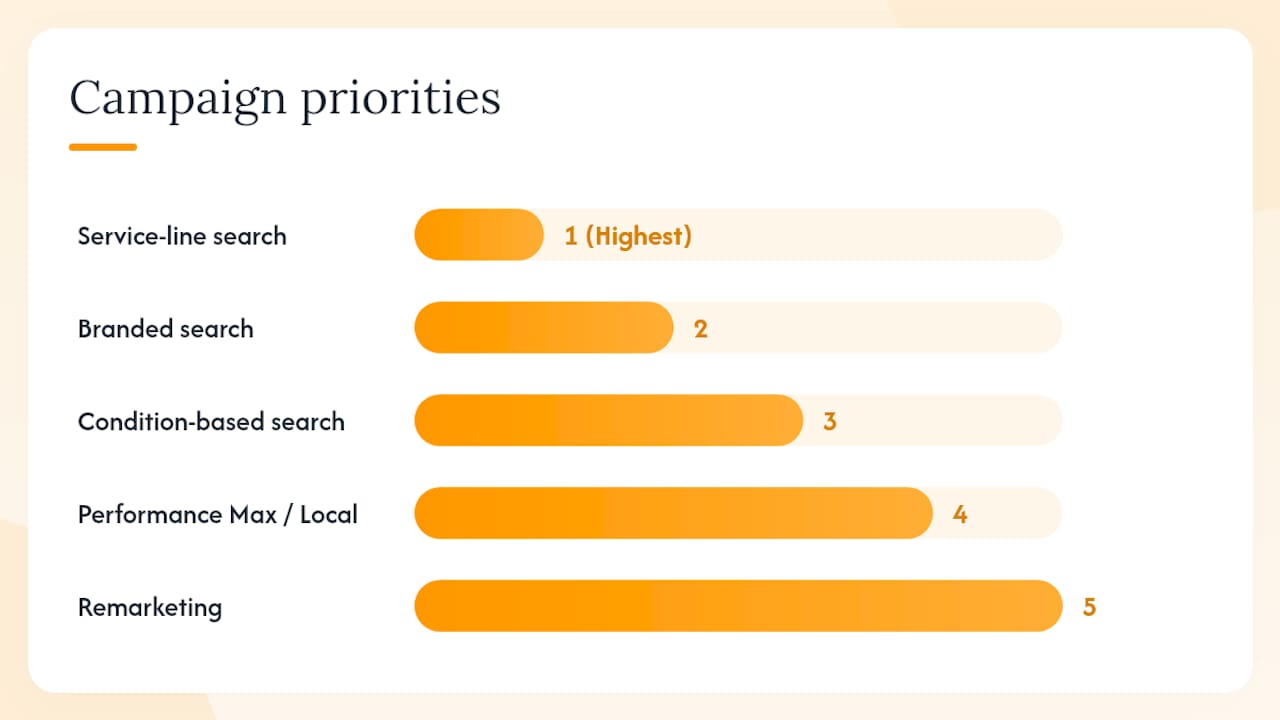
Recommended campaign types and priority order
| Campaign Type | Priority | Purpose | Quick Note |
|---|---|---|---|
| Service-line search | 1 (Highest) | Capture patients searching for a specific procedure or specialty | One campaign per major service line |
| Branded search | 2 | Protect your practice name from competitors | Low CPC, high intent — always run it |
| Condition-based search | 3 | Reach patients searching by symptom or diagnosis | Bridge from symptom to your service |
| Performance Max / Local | 4 | Expand reach across Google’s full inventory | Add after search campaigns have data |
| Remarketing | 5 | Re-engage site visitors who did not book | Requires audience size threshold |
Why splitting by service line matters
Sending all traffic into one campaign means a search for “dental implants near me” competes for budget with “teeth cleaning appointment.” Those two queries have radically different CPCs, conversion rates, and patient values. Separate campaigns let you set independent daily budgets, bid strategies, and landing pages for each service.
Split campaigns by both service line and location when you operate multiple offices. A practice with locations in Chicago and Naperville should run location-specific ad groups or separate campaigns so that ad copy, extensions, and landing pages reflect the right address and phone number.
Pro Tip: Keep 3–5 tightly themed ad groups per service-line campaign. Each ad group should map to one specific keyword cluster (e.g., “dental implants cost,” “dental implants near me,” “same-day dental implants”). Tighter groupings improve Quality Score, which directly lowers your cost-per-click over time.
A tightly structured account with one campaign per major service line and 3–5 ad groups per campaign improves Quality Score and makes performance far easier to interpret and optimize. Quality Score rewards relevance between your keyword, ad copy, and landing page — a structural advantage that compounds as your account matures.
What keywords should doctors target in Google Ads?
Keyword strategy for medical practice online ads is about intent, not volume. A search for “what causes lower back pain” is research. A search for “spine specialist near me accepting new patients” is a booking signal. Your budget belongs on the second type.
High-intent vs. informational keywords
High-intent (prioritize these):
- “Dermatologist near me”
- “Book appointment cardiologist [city]”
- “Knee replacement surgeon [zip code]”
- “Same-day urgent care [neighborhood]”
- “Dental implants cost [city]”
Informational (exclude or use only in content campaigns):
- “What is a dermatologist”
- “How long does knee replacement recovery take”
- “Signs of heart disease”
Recommended match-type mix
Use exact match for your highest-value, highest-confidence keywords. Use phrase match to capture natural language variations while maintaining intent control. Limit broad match to small test budgets with aggressive negative keyword lists, because broad match in healthcare regularly triggers irrelevant searches like “free medical advice” or “nursing school near me.”
For advanced keyword research tactics that inform long-tail and condition-based keyword lists, a structured research process pays off before you build a single ad group.
Negative keyword starting list for clinics
Add these to every campaign before launch:
- jobs, careers, hiring, salary, pay
- free, low cost, sliding scale (unless you offer these)
- school, training, program, course, degree, certification
- DIY, home remedy, natural cure
- veterinary, vet, animal
- insurance billing (if not relevant to your intake)
- research, study, clinical trial (unless you recruit)
Search Query Report cadence
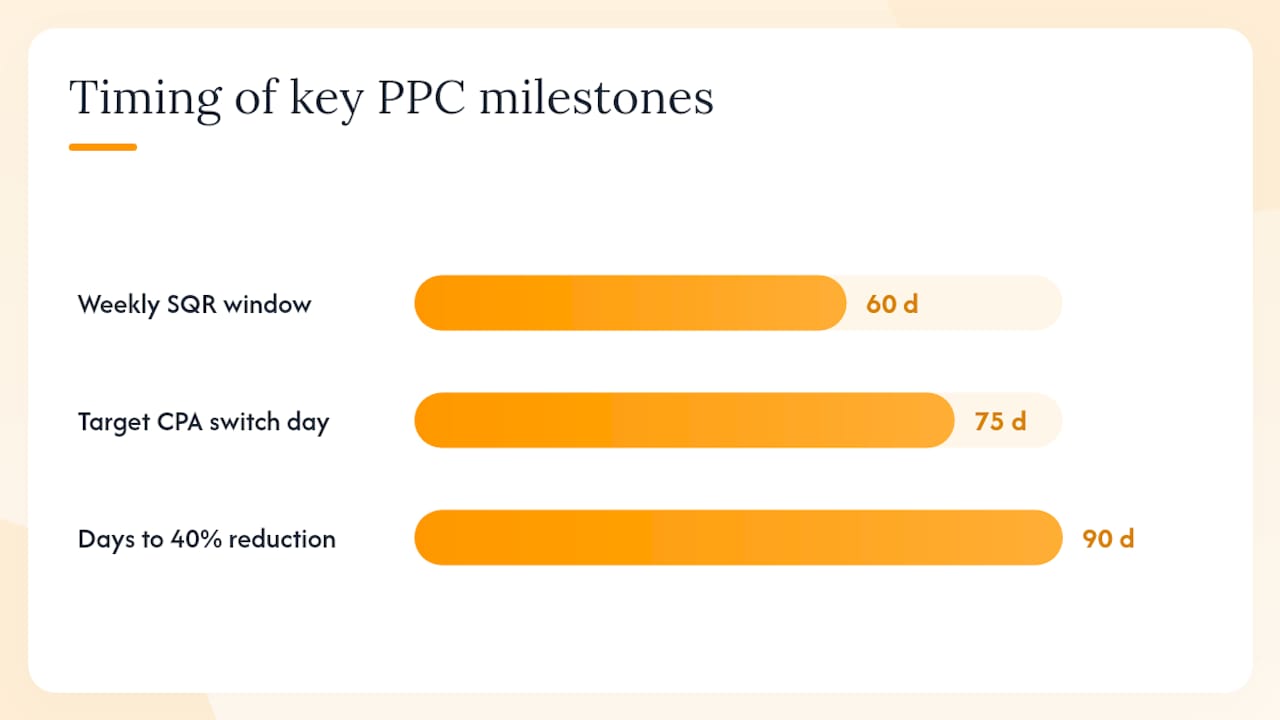
Pull your Search Query Report weekly for the first 60 days, then bi-weekly once the account stabilizes. Every irrelevant query you find is a negative keyword to add. Every high-converting query you find that is not yet in your keyword list is an exact-match keyword to add. This cadence is how you target relevant keywords with precision rather than guessing at what patients actually type.
How do you write compliant, high-converting ad copy for healthcare?
Ad copy for Google Ads campaigns for clinics must do two things simultaneously: pass Google’s healthcare advertising policies and speak directly to what a booking-ready patient is searching for. Those goals are not in conflict — they just require discipline.
Three policy-safe responsive search ad examples
Example 1: Primary care
- Headlines: “Primary Care in [City] | Same-Week Appointments | Board-Certified Physicians”
- Description: “New patients welcome. Book online or call today. Accepting most major insurance plans.”
Example 2: Orthopedic surgery
- Headlines: “Knee & Hip Specialists [City] | Minimally Invasive Options | Free Consultation”
- Description: “Fellowship-trained orthopedic surgeons. Get back to moving. Schedule your evaluation today.”
Example 3: Dermatology
- Headlines: “Dermatologist in [City] | Medical & Cosmetic Skin Care | Book Online”
- Description: “Treating acne, eczema, skin cancer, and cosmetic concerns. Same-week availability.”
Ad asset checklist
Use Google’s ad asset formats to increase relevance and conversion potential across every ad:
- Call assets: Display your phone number directly in the ad. Critical for mobile searchers who want to call immediately.
- Sitelink assets: Link to specific service pages (e.g., “Meet Our Doctors,” “Patient Forms,” “Insurance We Accept”).
- Location assets: Show your address and distance from the searcher. Connects your Google Business Profile to your ads.
- Structured snippet assets: List specialties or services (“Cardiology · Orthopedics · Sports Medicine”).
Policy line you must not cross: Google prohibits ads that make unsubstantiated health claims, guarantee treatment outcomes, or promote prescription drugs without proper certification. Avoid phrases like “guaranteed results,” “cure,” or “best doctor in city]” without verifiable backing. If your specialty falls under restricted healthcare categories (addiction treatment, clinical trials, certain telehealth services), you may need [LegitScript certification before your ads can run at all. LegitScript is an independent compliance organization that Google requires for certain healthcare advertisers — apply early, as approval takes time.
Pro Tip: Read your asset performance report monthly. Google labels each headline and description as “Best,” “Good,” or “Low” based on click-through rate. Swap out “Low” assets with new variations that test different value propositions — insurance acceptance, wait times, or a specific credential.
What does a high-converting landing page look like for a medical practice?
Sending paid search traffic to your homepage is one of the most common and costly mistakes in digital marketing for doctors. A homepage serves many audiences. A landing page serves one: the patient who just clicked your ad.
Landing-page checklist
- Message match: The headline on the landing page should mirror the headline in the ad. If the ad says “Knee Specialist in Chicago,” the page headline should say “Knee Specialist in Chicago” — not “Welcome to Our Orthopedic Practice.”
- One conversion action above the fold: Either a click-to-call button or an embedded booking widget. Do not make the patient scroll to find how to contact you.
- Minimal form fields: Name, phone number, and preferred appointment time. Nothing more on the initial form. Move clinical history collection to a secured patient portal after the appointment is confirmed.
- Trust signals: State medical license number, board certifications, years in practice, and a selection of verified patient reviews. Place these within the first scroll.
- Page speed: Aim for a load time under 3 seconds on mobile. Slow pages lose patients before they ever read your headline.
- HTTPS: Every landing page must be served over a secure connection. This is a baseline trust and compliance requirement.
Mobile-first requirements
More than half of healthcare searches happen on mobile devices. Your click-to-call button needs to be large, high-contrast, and visible without scrolling. Forms should auto-fill where possible and require no more than three taps to submit. Test your landing page on an actual phone, not just a browser simulator.
PHI on landing pages
HHS guidance on HIPAA and online tracking makes clear that browser-based pixels on pages where patients enter health information can constitute an impermissible disclosure of protected health information (PHI). Keep your initial landing page form limited to name, phone, and appointment time. Do not place intake forms, symptom questionnaires, or insurance fields on pages that fire standard browser pixels to ad platforms. Those data collection steps belong behind a Business Associate Agreement (BAA)-protected portal.
How should you set geo-targeting, bidding, and budgets for clinic campaigns?
Local targeting is where medical practice online ads either earn their keep or waste it. A practice in suburban Dallas does not need impressions in Fort Worth unless it draws patients from there.
Radius targeting best practices
Google Ads location targeting controls let you set a radius around your practice address or target specific zip codes and cities. Start with a radius that reflects your realistic patient draw area — typically 5–15 miles for primary care and urgent care, and up to 30–50 miles for highly specialized procedures where patients travel farther. Use zip-code-level targeting when you want to concentrate spend in high-density or high-income neighborhoods that match your patient profile.
Budget allocation across campaign types
A practical starting allocation for a practice with a moderate monthly ad budget:
- Service-line search (top 1–2 procedures): 50–60% of total budget
- Branded search: 10–15% (low CPC, high return — never cut this)
- Condition-based search: 15–20%
- Remarketing: 5–10%
- Testing budget (new service lines or Performance Max): 5–10%
Bid strategy progression
When conversion volume is low (fewer than 30 conversions per month), use Maximize Clicks to gather data. Once you have reliable conversion signals, switch to Maximize Conversions, then to Target CPA once you have a stable cost-per-acquisition baseline. Manual CPC remains useful for branded campaigns and small ad groups where you want precise control.
Scheduling and audience layering
Run ads during hours when your phones are staffed and your booking system is live. A patient who clicks at 11 PM and cannot reach anyone is a lost lead. Layer in-market audiences for healthcare services as observation segments — this gives you performance data by audience without restricting reach. Adjust device bids based on your conversion data; mobile often drives call conversions while desktop drives form submissions.
How do you track booked appointments safely and measure what matters?
Conversion tracking is where most PPC advertising for healthcare setups fall short. Clicks and impressions tell you nothing about patient acquisition. The metrics that matter are cost-per-booked-visit, click-to-book conversion rate, show rate, and patient acquisition cost.
Conversion types to configure
- Phone calls from ads: Track calls lasting longer than 60 seconds as a conversion.
- Phone calls from the website: Use Google forwarding numbers or a call-tracking integration.
- Booking confirmation page views: Fire a conversion event when a patient lands on your “appointment confirmed” page.
- Form submissions: Track as a micro-conversion, but weight booked appointments more heavily in your bidding.
Server-side tagging and HIPAA
Standard browser pixels (including Google’s gtag.js) send raw event data directly from the patient’s browser to Google’s servers. When that data includes health-related URL parameters, form field values, or IP addresses tied to a health condition search, it can constitute PHI under HIPAA. Server-side tagging routes conversion events through a server you control, where you strip identifiers and send only hashed, de-identified signals to Google Ads. This is the technical pattern that reduces HIPAA risk while preserving measurement accuracy. For a deeper look at how this intersects with your overall marketing compliance, the HIPAA compliant marketing guide from Theartistevolution covers the full scope.
As Paubox notes, Google’s updated personalized advertising policy does not make Google Ads itself HIPAA compliant. Advertisers remain fully responsible for ensuring that no PHI flows through their tracking setup to ad platforms.
KPI dashboard priorities
Track these in order of importance:
- Cost-per-booked-visit: Total ad spend divided by confirmed appointments
- Click-to-book conversion rate: Percentage of clicks that result in a booked appointment
- Show rate: Percentage of booked appointments that actually show up (ties ad quality to real revenue)
- Patient acquisition cost: Total cost including agency fees divided by net new patients
- CPC and CTR: Useful for diagnosing creative and keyword issues, but never the primary success metric
Zocdoc’s SEM guidance reinforces this priority: measuring beyond CPC toward cost-per-booked-visit and show rate is what separates campaigns that look good in a dashboard from campaigns that actually grow a practice.
Measurement note: Enhanced Conversions in Google Ads can improve conversion matching accuracy by sending hashed first-party data (email, phone) to Google. In a healthcare context, implement Enhanced Conversions only after confirming with your privacy counsel that the data being hashed and transmitted does not constitute PHI under your specific use case.
HIPAA and ad-platform compliance checklist for U.S. practices
HIPAA compliance in advertising is not optional, and it is not solved by checking a box in your Google Ads account settings. It requires deliberate technical and operational choices before you launch.
Pre-launch compliance checklist
- BAA review: Google does not sign a BAA for its advertising products. This means you must ensure that no PHI flows from your site to Google Ads through your tracking implementation.
- Limit form fields: Collect only name, phone, and preferred appointment time on ad landing pages. No diagnosis fields, no insurance ID, no date of birth.
- Cookie consent flow: Implement a consent management platform (CMP) that gives patients control over tracking cookies before any pixel fires.
- Server-side tagging: Route conversion events through a server-side container (Google Tag Manager server-side or equivalent) to strip identifiers before sending signals to ad platforms.
- Audit your pixels: Remove or gate any pixel that fires on pages where patients enter health information. This includes intake forms, symptom checkers, and patient portal login pages.
Red-flag actions that commonly leak PHI
- Standard browser pixels placed on appointment confirmation pages that include condition or procedure names in the URL
- Sending full form submission data (including free-text fields) to third-party APIs via client-side tags
- Passing URL query parameters containing health condition codes or referral sources to ad platforms
- Using remarketing audiences built from pages that indicate a specific health condition
Official resources to consult
- HHS HIPAA online tracking guidance: The primary federal guidance on what constitutes an impermissible disclosure through web tracking.
- Google healthcare advertising policies: Governs what categories require certification and what claims are prohibited.
- LegitScript: Required certification for certain healthcare advertisers including addiction treatment, telehealth, and some pharmacy categories.
- State-level advertising rules: Several states (California, New York, Texas) have additional consumer protection and health data privacy laws that layer on top of federal HIPAA requirements.
Consult qualified legal or privacy engineering counsel for any nonstandard use case, including telehealth, mental health, addiction treatment, or any service that collects sensitive health data during the ad-driven intake process.
What mistakes do clinics make with Google Ads, and how do you fix them?
Most wasted spend in medical PPC comes from a handful of structural mistakes, not from bad creative. Fix the structure first.
The most common budget killers
- Broad-match keywords without negatives: Broad match in healthcare pulls in job seekers, students, and researchers. Without a robust negative keyword list, you pay for clicks that will never convert.
- Sending traffic to the homepage: Homepage traffic converts at a fraction of the rate of dedicated landing pages. Every service-line campaign needs its own page.
- Ignoring the Search Query Report: The queries patients actually type often differ significantly from the keywords you bid on. Weekly review is non-negotiable in the first 90 days.
- Optimizing to clicks instead of bookings: Click-through rate is a vanity metric in healthcare. If your bid strategy optimizes for clicks, you will get cheap clicks from people who never book.
- Skipping call tracking: Phone calls are often the primary conversion action for medical practices, especially for older patient demographics. Untracked calls make your conversion data look worse than it is.
Weekly and monthly optimization cadence
Weekly:
- Pull Search Query Report and add new negatives
- Check for budget pacing issues (over- or under-delivery)
- Review call recording samples for quality signals
Monthly:
- Review asset performance and swap out low-performing headlines
- Analyze landing-page conversion rates by campaign
- Run A/B tests on landing-page headlines or CTA button copy
- Evaluate bid strategy performance and consider progression (Maximize Clicks → Maximize Conversions → Target CPA)
Quarterly:
- Audit full account structure for relevance and efficiency
- Review geographic performance data and adjust radius or zip-code targeting
- Evaluate new service lines for campaign expansion
- Benchmark cost-per-booked-visit against prior quarters
Ready-to-use campaign templates by specialty
These three templates give you a plug-and-play starting point. Adjust keywords and budgets to your market — CPLs vary widely by city, specialty, and competition level.
Template 1: Dental implants
Campaign: Dental Implants [City]
Ad groups: Dental Implants Cost | Dental Implants Near Me | Same-Day Dental Implants | All-on-4 Implants
Sample keywords (phrase and exact match):
- “dental implants cost [city]”
- “affordable dental implants near me”
- “same day dental implants [city]”
- “all on 4 dental implants [city]”
Negatives: free, cheap, DIY, dental school, dental assistant, dental hygienist jobs
Sample ad headline set: “Dental Implants in [City] | Financing Available | Free Consultation”
Landing-page headline match: “Restore Your Smile with Dental Implants in [City] — Free Consultation”
Conservative CPL estimate: $80–$150 | Aggressive CPL estimate: $150–$300 (varies by market)
Template 2: Cosmetic dermatology
Campaign: Cosmetic Dermatology [City]
Ad groups: Botox Near Me | Laser Skin Treatments | Chemical Peels [City] | Fillers [City]
Sample keywords:
- “botox near me”
- “laser skin resurfacing [city]”
- “dermal fillers [city]”
- “chemical peel appointment [city]”
Negatives: DIY, at home, training course, school, certification, salary
Sample ad headline set: “Botox & Fillers in [City] | Board-Certified Dermatologist | Book Online”
Landing-page headline match: “Expert Cosmetic Dermatology in [City] — Book Your Consultation Today”
Conservative CPL estimate: $60–$120 | Aggressive CPL estimate: $120–$250
Template 3: Primary care / urgent care
Campaign: Primary Care [City]
Ad groups: Primary Care Near Me | Urgent Care Same Day | New Patient Primary Care | Annual Physical [City]
Sample keywords:
- “primary care doctor near me accepting new patients”
- “urgent care [city] open now”
- “same day doctor appointment [city]”
- “annual physical exam [city]”
Negatives: free clinic, sliding scale (unless applicable), jobs, nurse practitioner school, medical school
Sample ad headline set: “Primary Care in [City] | Same-Week Appointments | Most Insurance Accepted”
Landing-page headline match: “New Patients Welcome — Primary Care in [City]”
Conservative CPL estimate: $30–$70 | Aggressive CPL estimate: $70–$150
Quality Score is a direct lever on these CPL ranges. Well-structured ad groups with tight keyword-to-ad-to-landing-page relevance consistently achieve lower CPCs than loosely organized accounts in the same market.
What should you report to practice owners, and how long do results take?
Reporting for PPC advertising in healthcare needs to connect ad spend to clinical outcomes, not just marketing metrics. Practice owners and administrators care about one number above all others: how much did it cost to get a new patient through the door?
Reporting template checklist
- Cost-per-booked-visit by campaign and service line
- Total conversions (calls + form submissions + booking confirmations) by week
- Click-to-book conversion rate by landing page
- Show rate (where bookings can be matched to attendance data)
- Impression share for branded campaigns (a drop signals a competitor bidding on your name)
- Monthly spend vs. budget pacing
For a structured approach to connecting these metrics to revenue, the marketing ROI measurement guide from Theartistevolution provides frameworks that translate campaign data into practice-level financial impact.
Attribution notes
Last-click attribution is the default in Google Ads, but it undervalues upper-funnel touchpoints. Switch to data-driven attribution once you have sufficient conversion volume. For appointment-based businesses, use a 30-day click conversion window and a 1-day view-through window — most patients book within a week of their first search, but some research for longer before committing.
Timeline to judge performance
- Days 1–30: Data collection. Do not make major structural changes. Add negatives, fix tracking errors, and let the algorithm learn.
- Days 30–60: First optimization cycle. Evaluate keyword performance, swap low-performing assets, and confirm landing-page conversion rates.
- Days 60–90: Bid strategy transition. If you have 30+ conversions per month, move from Maximize Clicks to Maximize Conversions.
- Day 90+: Scale what works. Add new service-line campaigns, test Performance Max, and begin evaluating lifetime value by patient source.
Merging phone-call tracking data with your booking system (whether that is Athenahealth, Kareo, or a custom EHR) gives you the most accurate attribution picture. Even a simple spreadsheet that matches call-tracking numbers to booked appointments by week dramatically improves your ability to judge true cost-per-acquisition.
Results clinics achieve with a structured Google Ads approach
A structured PPC approach for healthcare follows a consistent process: audit the existing account or build from scratch, implement server-side conversion tracking, build service-line campaigns with dedicated landing pages, and optimize weekly against booked-appointment data.
One anonymized example from a multi-location specialty practice: after restructuring from a single broad campaign into four service-line campaigns with dedicated landing pages and server-side call tracking, the practice reduced its cost-per-booked-visit by more than 40% within 90 days. The primary driver was eliminating broad-match waste and aligning bid strategy to confirmed appointments rather than form fills.
The process that produced that result:
- Full account audit identifying wasted spend by keyword and campaign
- Server-side tagging implementation to accurately track phone calls and booking confirmations without PHI exposure
- Service-line campaign build with 3–5 ad groups per campaign and dedicated landing pages
- Negative keyword list of 80+ terms added at campaign launch
- Weekly Search Query Report review for the first 60 days
- Bid strategy progression from Maximize Clicks to Target CPA at day 75
The structural insight that most practices miss: Google Ads rewards relevance at every level of the account. A keyword that exactly matches a patient’s search, paired with an ad that speaks directly to that search, paired with a landing page that continues that exact conversation, earns a higher Quality Score — and a lower CPC. The practices that win on paid search are not the ones with the biggest budgets. They are the ones with the tightest account architecture.
Theartistevolution’s healthcare campaign work and PPC management service are built around this same architecture-first approach, applied across specialties from dental to dermatology to multi-location primary care.
When should a practice run its own ads vs. hire an agency?
The honest answer depends on three variables: scale, compliance risk, and internal bandwidth.
A solo practitioner with one location, a clear service line, and a staff member who can spend four to six hours per week on the account can run a competent Google Ads setup using the templates in this article. The risk is manageable, the learning curve is real but survivable, and the cost savings are genuine.
The calculus shifts when you add locations, specialties with LegitScript requirements (addiction treatment, telehealth, certain mental health services), or any situation where PHI could flow through your tracking setup. At that point, the compliance risk of a misconfigured pixel is not a marketing problem — it is a legal one. The cost of a HIPAA breach investigation dwarfs any agency fee.
Multi-location practices, high-ticket specialty procedures, and any practice that cannot dedicate consistent weekly time to account optimization are the clearest cases for managed PPC. What to expect from a managed engagement: a structured onboarding audit, server-side tracking implementation, campaign builds with dedicated landing pages, and a monthly reporting cadence that ties spend to booked appointments. The agency should own the account structure and optimization cadence; the practice should own the clinical messaging and patient intake process.
Theartistevolution builds compliant, results-driven Google Ads for medical practices
Running Google Ads for a medical practice is not the same as running ads for an e-commerce store. The compliance requirements are real, the keyword economics are different, and the metric that matters — cost-per-booked-visit — requires a measurement setup most general agencies never configure correctly.
Theartistevolution has spent over 18 years building and managing campaigns for healthcare clients, with a process that starts with compliance and ends with booked appointments. Every engagement includes a full account audit, HIPAA-aware server-side tracking setup, service-line campaign architecture, dedicated landing-page builds, and ongoing weekly optimization.

Whether you are launching your first campaign or inheriting a broken account, the right starting point is a clear-eyed audit of where your current setup stands. Request a marketing assessment or explore Theartistevolution’s PPC management services to see exactly what a managed engagement looks like for a practice at your stage.
Primary sources and further reading
- HHS: Guidance on HIPAA and online tracking — The definitive federal guidance on what constitutes an impermissible PHI disclosure through web pixels and tracking tools.
- Google Ads ad assets documentation — Official reference for call, sitelink, location, and structured snippet assets that healthcare advertisers should configure.
- Google Ads location targeting — Step-by-step guidance on radius, zip-code, and city-level targeting controls.
- Google Ads overview (Wikipedia) — Accessible background on auction mechanics and ad formats for readers new to the platform.
- Is Google Ads HIPAA compliant? (Paubox, 2026 update) — Clear explanation of why Google’s policy updates do not transfer HIPAA compliance obligations to the platform.
- Zocdoc: 7 tips to boost your SEM campaigns — Healthcare-specific SEM guidance focused on intent, message match, and outcome-based measurement.
- Healthcare SEO: A 90-Day Strategy Guide — How paid search and organic SEO work together to build a complete patient acquisition strategy.
This article is general information, not a substitute for advice from a qualified lawyer. Consult a qualified legal professional about your own circumstances before acting on anything here.
Sources
- HHS: Guidance on HIPAA and online tracking
- Support
- Support
- En
- Is Google Ads HIPAA compliant? (2026 update) – Paubox