
Brand video types are the standard formats marketers use to answer different buyer questions, grouped by what shows up on screen: your company, your product, your customers, or the experience of using what you sell. The fastest way to choose one is simple: pick by whom you need to reach, what question they’re asking, and where they’ll actually watch. This guide catalogs the common formats, shows when each earns its budget, and walks through production and repurposing so one shoot works harder for you.
TL;DR:
- The choice of video format should be guided by the audience, funnel stage, and placement, not by current trends or popular formats.
- Different video types serve specific marketing objectives: company stories for awareness, product demos for consideration, and testimonials or case studies for decision and retention.
- Planning repurposing options, such as short clips and captions, should occur before production to maximize content use across multiple channels.
- Live-action builds trust for stories involving real people, while animation offers control over visuals for explainers and abstract concepts.
- The ABCD framework emphasizes capturing attention, building brand awareness, connecting emotionally, and guiding viewers to action, especially within the first few seconds of a video.
Table of Contents
- Group your options by what’s on screen, not by trend
- The 10 brand video types worth knowing
- How to choose which video to make first
- Production choices that stretch your budget further
- Apply the ABCD framework to make brand video ads work harder
- What actually moves the needle when you hire help
- How The Artist Evolution can help you plan your next video
- Sources
- FAQ
Group your options by what’s on screen, not by trend
Marketers often start by asking “what’s a popular video format right now” and end up with a list too long to act on. A better filter groups every brand video type into four buckets: company (your story, mission, values), product (what it does and how), customer (proof from real buyers), and experience (what it feels like to use or attend). Each bucket maps naturally to a stage in the funnel.
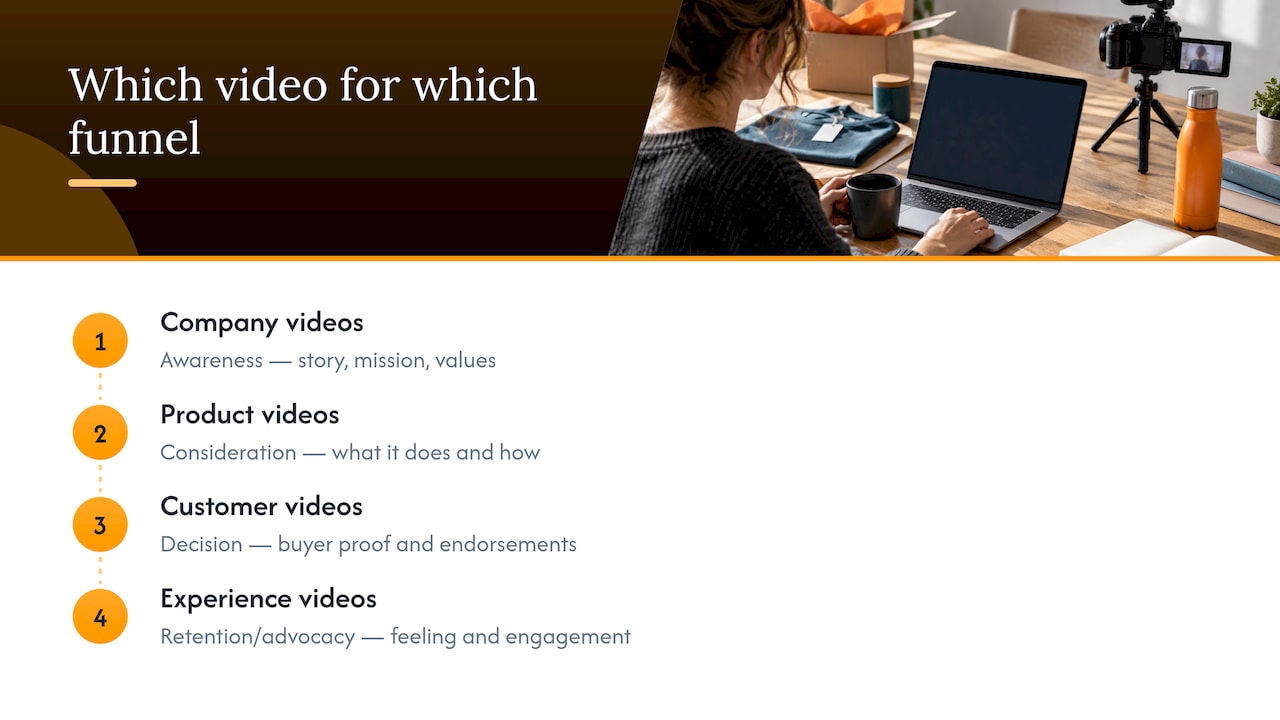
Company videos tend to do the heavy lifting in awareness, introducing who you are before anyone’s ready to buy. Product videos carry consideration, answering the practical “how does this work” question. Customer videos close the gap in decision-making, because a stranger’s endorsement moves people further than your own claims. Experience videos support retention and advocacy, keeping existing customers and employees engaged after the sale or the hire.
This four-group model shortens a long list into a short, defensible choice. Once you know your funnel stage, you’ve already eliminated most of the catalog below.
The 10 brand video types worth knowing
Ten formats cover nearly every request marketing teams field, and they fall into the four groups above. A commonly referenced industry breakdown organizes them the same way: by company, product, customer, or experience.
- Company story: Tells your origin and mission; best on your homepage or About page; supports brand awareness and time-on-site; run 60 to 90 seconds, live-action interview style.
- Brand profile: A shorter, punchier cousin of the company story built for social feeds; supports reach and recall; keep it under 60 seconds.
- Product video: Shows the product in action for a specific use case; lives on product pages; supports add-to-cart or demo requests; 30 to 60 seconds works for most categories.
- Explainer: Breaks down a concept or workflow, often animated, for products with a learning curve; supports onboarding and sales-call follow-up. The distinction between a brand story and a product explainer matters because they answer different questions at different funnel stages.
- How-to, demo, or training video: Walks through a specific task step by step; lives in help centers and onboarding flows; supports support-ticket reduction and activation.
- Testimonial: A short, direct quote from a customer describing a result; placed on landing pages near a CTA; supports conversion rate.
- Interview: A longer conversational format with a customer, employee, or partner; supports recruiting pages and thought-leadership content.
- Case study video: A structured before-and-after narrative with specifics, usually longer than a testimonial; placed on a dedicated case study page; supports sales-enablement and late-stage decision-making.
- Event video: Recaps a conference, launch, or in-store activation; supports social engagement and press mentions.
- Behind-the-scenes: Shows process, culture, or production; supports recruiting and social engagement more than direct conversion.
Testimonials and case studies often get confused, but the difference is length and structure: a testimonial is one quote, a case study is a narrative with a problem, an approach, and a result. Product videos and explainers get confused too: a product video shows the thing working, an explainer teaches a concept the thing solves. Once you shoot any of these, plan to cut short clips for social. Research on repurposing longer content into shorter promotional clips found that testing multiple short cuts and measuring emotional response can make those clips more effective than a single trailer.
How to choose which video to make first
Most teams stall not because they lack ideas but because they haven’t agreed on the filter. Before greenlighting anything, run through a short checklist: who is the audience, what’s the objective, what funnel stage are they in, where will it live, what’s the budget, and how will you repurpose it. Answering those six questions out loud with stakeholders eliminates most disagreements before production starts.
From there, three workflows cover the majority of requests:
- Early awareness: If your audience doesn’t know you yet, start with a company story or brand profile, distributed on your homepage and top-of-funnel social.
- Product-led sales: If your audience knows you but hasn’t bought, prioritize a product video, explainer, or demo, placed on product pages and in sales follow-up emails.
- Retention or recruiting: If your audience already buys or works with you, invest in a case study, behind-the-scenes video, or testimonial, placed on dedicated landing pages and careers pages.
Pro Tip: Pick the workflow before you pick the video type. The type falls out naturally once you know the funnel stage.
Measure results with five KPIs: view rate, watch time, click-through rate, downstream conversions, and engagement (likes, shares, comments). Effective video planning starts with the audience and selecting the format and channel together, according to expert guidance on collaborative content workflows, rather than producing something generic and hoping it fits somewhere later.
Production choices that stretch your budget further
Live-action and animation solve different problems. Live-action video builds trust through real faces and real settings, which suits company stories, testimonials, and case studies. Animated video gives you tighter control over pacing and visuals for abstract concepts, which suits explainers and how-to content. Animation is often faster to revise; live-action is often faster to shoot once the script is locked.
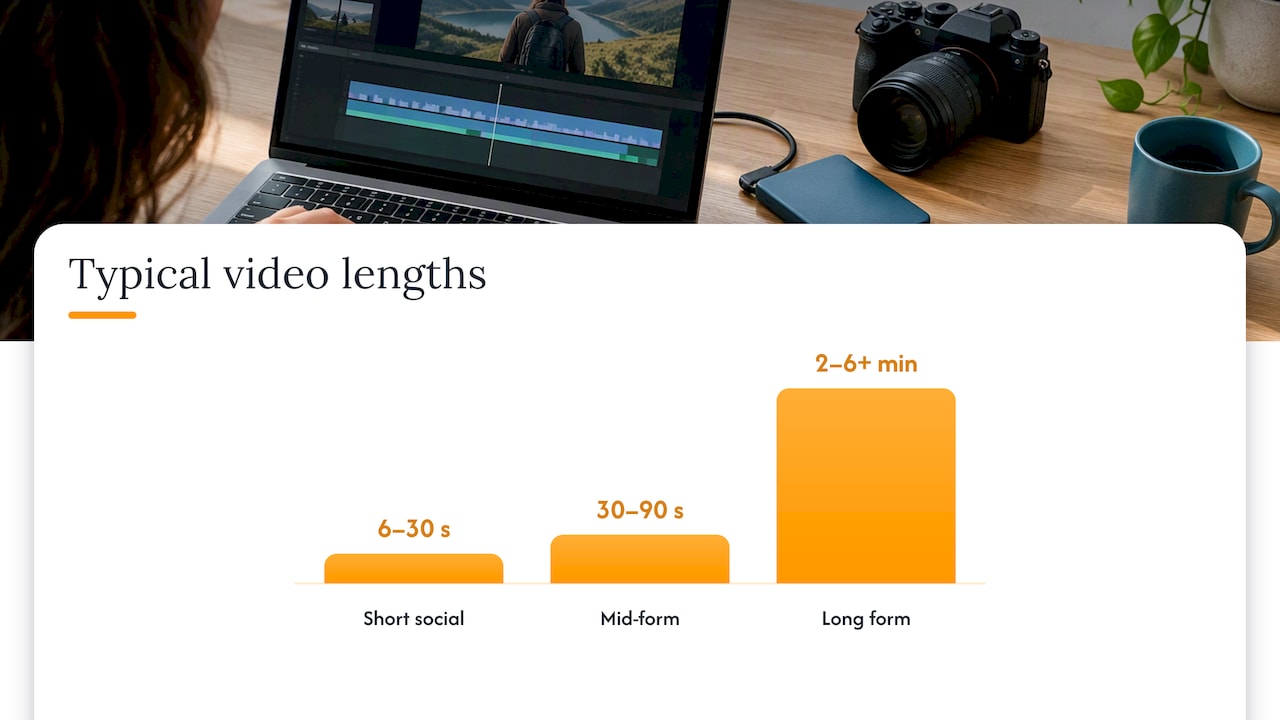
Length depends on the platform. Short social clips run 6 to 30 seconds, mid-form content runs 30 to 90 seconds, and long-form brand films or case studies run 2 to 6 minutes or more. Watch aspect ratio and captions closely: vertical for social feeds, square or horizontal for websites, and captions everywhere, since most social viewing happens with sound off.
Plan repurposing before you shoot, not after:
- Cut 3 to 6 short clips from the primary asset for social.
- Pull stills for thumbnails and paid ad creative.
- Build a caption file alongside the edit, not as an afterthought.
- Create at least one vertical edit for mobile-first placements.
One shoot, several assets: planning the derivative clips, captions, and stills before production starts is what turns a single production into a full content set instead of one video that gets used once.
Apply the ABCD framework to make brand video ads work harder
Google’s ABCD framework, drawn from its YouTube creative playbook, gives four jobs every ad creative needs to do: attract attention, build the brand, connect emotionally, and direct the viewer toward action. The playbook recommends introducing your brand or product within the first five seconds and using distinctive, recognizable brand assets rather than burying them at the end.
- Attract: Open with people or motion in the first few seconds, not a logo card.
- Brand: Show your product or brand identity early and often, not just at the close.
- Connect: Use a real voice or story beat that a viewer can relate to quickly.
- Direct: Add an on-screen, readable CTA rather than relying on narration alone.
Short-form social ads need to compress all four jobs into the first three seconds, while longer landing-page videos can build more slowly, as long as brand cues appear early. Tailoring creative to the audience pays off at scale, too: a Decathlon experiment on YouTube using customized video variants lifted incremental online conversions by 175% at a 64% lower cost per conversion in one test. Tools like Bria Create now let teams generate multiple on-brand variants of the same creative without reshooting, which makes that kind of testing more accessible to smaller teams.
What actually moves the needle when you hire help
An experienced marketing agency has spent many years building brand video and campaign strategy for clients across retail, healthcare, legal, and entertainment sectors. Our brand story development case study shows how a company-focused narrative video gets built and placed across a full campaign rather than as a one-off asset.
Hiring an agency tends to make immediate sense in three situations: your internal team is stretched too thin to plan and shoot regularly, you need clips repurposed across multiple channels faster than one person can turn them around, or you’re running an integrated campaign where video needs to match paid media, SEO, and website messaging at the same time. A managed partner typically delivers a shot list, a primary asset, social-ready clips, captions, and a distribution plan, all tied to the KPIs you’re already tracking.
How The Artist Evolution can help you plan your next video
If you’re weighing company, product, or customer video against a real campaign calendar, that’s exactly where our Brand Development and Strategy & Management services fit. We build the story, pick the formats, and manage placement so a single production turns into a full set of assets across your site and social channels.
Reach out through Theartistevolution to talk through your next video and where it should live.
Sources
References: Google’s ABCD playbook, AMA sessions on collaborative video and short-clip testing, and the Decathlon creative experiment.
FAQ
What are the main types of brand videos?
The main types fall into four groups based on what’s on screen: company videos (story, brand profile), product videos (product demos, explainers, how-tos), customer videos (testimonials, interviews, case studies), and experience videos (event recaps, behind-the-scenes). Choosing among them starts with your audience and funnel stage rather than the format itself.
How do I choose which brand video to make first?
Start by identifying your audience, their funnel stage, and where they’ll watch, then match that to a workflow: awareness calls for a company story, sales calls for a product video or explainer, and retention calls for a case study or testimonial. A short checklist covering audience, objective, channel, and budget usually settles the decision quickly.
Should I use animation or live-action for my brand video?
Live-action suits stories that rely on real people and real trust, like testimonials and company profiles, while animation suits abstract concepts that benefit from tighter visual control, like explainers. Both approaches can work for the same budget range; the right choice depends on the story you’re telling, not a fixed rule.
What is the ABCD framework for video ads?
ABCD stands for attract, brand, connect, and direct, a framework from Google’s YouTube creative playbook that recommends introducing your brand within the first five seconds and closing with a clear on-screen call to action. It applies to both short social ads and longer brand films, though short formats need to compress all four jobs into the opening seconds.
How long should a brand video be?
Length depends on the platform: short social clips typically run 6 to 30 seconds, mid-form videos run 30 to 90 seconds, and long-form brand films or case studies run 2 to 6 minutes or more. Planning the primary asset and its shorter derivatives together, rather than shooting once and cutting later, keeps every length purposeful.
— Derek