
Sales enablement content is any resource, internal or external, that helps a seller advance a deal or helps a buyer justify a purchase decision to their own stakeholders. Done right, it cuts sales cycle friction and lifts win rates, because reps stop improvising and buyers get exactly the proof they need at the exact moment they need it. The payoff shows up fast: faster rep ramp time, sharper buyer conversations, and fewer deals stalling out for lack of the right document at the right stage.
TL;DR:
- Most enablement content should be tailored to deal stage and buyer role, with discovery assets focusing on reframing problems and evaluation tools addressing specific stakeholder needs.
- Collateral delivery must be concise, mobile-friendly, and often interactive to generate genuine engagement and avoid cluttering the buyer’s decision process.
- Organizing content with tags by deal stage, persona, and vertical, along with embedding assets directly into CRM, ensures quick access during live conversations.
- Regular audits, deal impact scoring, and seller feedback channels are essential to keep the content library current, relevant, and used effectively.
- Building enablement content collaboratively with sales and product teams, and utilizing external agencies for strategy and asset development, accelerates library quality and adoption.
Table of Contents
- Types of Sales Enablement Content Every Revenue Team Needs
- Which Content Fits Each Deal Stage and Buyer Role
- How to Build a Sales Enablement Content Program That Actually Gets Used
- Organizing Content So Sellers Can Actually Find It
- Measuring Whether Your Content Is Actually Working
- Real Playbooks From The Artist Evolution’s Client Work
- What Most Teams Get Wrong About Enablement Content
- Get Hands-On Help Building Your Enablement Content Library
- Sources
- FAQ
Types of Sales Enablement Content Every Revenue Team Needs
Enablement content splits into two distinct workflows that work toward the same goal from opposite directions. Internal content prepares sellers to have the conversation. External content gives buyers what they need to sell your solution internally, to their own boss, procurement team, or technical evaluators. Treating these as one undifferentiated pile of “sales collateral” is the fastest way to end up with a messy library nobody trusts, a distinction the Sales Enablement Collective draws clearly in its breakdown of the category.
Internal assets (seller-facing):
- Battlecards that summarize competitor positioning, objection responses, and win themes in a single scannable page.
- Playbooks covering how to run discovery calls, qualify opportunities, or handle specific verticals like healthcare or legal.
- Call and demo libraries where new reps can watch top performers handle live objections.
- Training modules built around real skills gaps, not generic onboarding checklists.
- Win/loss stories that explain, in plain language, why a deal closed or died.
External assets (buyer-facing):
- Case studies that show a comparable company solving a comparable problem, with real outcomes.
- ROI calculators that let a buyer plug in their own numbers instead of trusting your projections.
- One-pagers summarizing the offer for a stakeholder who will never sit through a full demo.
- Demo videos that work asynchronously, since not every buyer commits to a live call.
- Mutual action plans that lay out the steps, owners, and dates both sides agree to.
Format matters as much as content. Internal training should stay short enough to consume on a phone between calls. The Atlassian Loom guide to sales enablement content recommends keeping internal training bite-sized specifically because sellers are mobile-first, and a 20-minute training video simply will not get watched. External assets need the opposite discipline: concise enough to forward without a cover email explaining what it is. A one-pager that needs a one-pager to explain it has already failed. Interactive formats deserve a mention here too. Digital demos that let a prospect click through a product on their own time, rather than sit through a scripted walkthrough, tend to generate stronger engagement signals sellers can act on, because self-directed exploration shows genuine interest rather than polite attention.
Which Content Fits Each Deal Stage and Buyer Role
Matching the right asset to the right moment is where most enablement libraries either earn their keep or get ignored. Buyers do not move through a purchase alone. Gartner’s research on the B2B buying journey shows deals typically involve multiple stakeholders evaluating different criteria in parallel, not sequence, which means one generic deck cannot serve a technical evaluator and a budget owner equally well.
- Discovery stage: Lead with a short diagnostic or point-of-view piece that reframes the buyer’s problem. This is not the moment for a full case study; it’s the moment to earn a second meeting.
- Evaluation stage: Deploy comparison one-pagers, demo videos, and battlecards addressing the alternatives the buyer is likely weighing. Technical buyers want specification sheets and integration documentation here. Economic buyers want the ROI calculator.
- Decision stage: This is when the mutual action plan earns its place, alongside a case study that mirrors the buyer’s industry and company size as closely as possible. Procurement stakeholders typically want security documentation and contract terms, not marketing narrative.
- Post-sale: Onboarding guides and success story templates help account teams protect the deal and set up expansion conversations later.
A multi-stakeholder software deal illustrates why this mapping matters. The technical lead needs an architecture diagram. The economic buyer needs the ROI math. The end user just wants to know the tool won’t make their week harder. Sending all three the same generic brochure guarantees at least two of them tune out.
How to Build a Sales Enablement Content Program That Actually Gets Used
Start with an audit, not a brainstorm. Pull every asset currently in circulation, including the ones living in someone’s personal Google Drive, and flag anything untouched in the last 6 to 12 months for review or retirement, a cadence the Sales Enablement Collective points to as a baseline discipline for keeping a library credible.
From there, prioritize by deal impact rather than by what’s easiest to produce. A simple scoring method works: rate each proposed asset on how many active deals it would touch, how often sellers have asked for it, and how directly it addresses a stage where deals currently stall. Anything scoring low on all three gets deprioritized, no matter how appealing it sounds in a planning meeting.
Creation itself needs to be collaborative, not a marketing exercise handed down from above. ON24’s guidance on content marketing and sales enablement makes the point directly: content built without sales and product input tends to miss the language buyers actually use and the objections reps actually hear. One effective fix is mining recorded calls for real buyer phrasing. Voice-of-customer analysis through conversation intelligence lets teams pull verbatim objections and language straight into battlecards and email templates, which tends to land better than anything written from a marketing brainstorm.
- Run a quarterly audit against the 6 to 12 month staleness rule.
- Score every new asset request against deal impact before greenlighting it.
- Pull three to five real call recordings before drafting any external-facing script.
- Build short explainer videos (2 to 3 minutes) showing sellers exactly how and when to use a new asset.
- Embed templates directly inside the CRM opportunity record so sellers don’t have to go hunting.
- Open a standing feedback channel, even something as simple as a Slack channel, where reps flag what’s missing.
Pro Tip: Before building a single new asset, ask your top five sellers what they currently improvise on every call. That gap is almost always your highest-impact content priority, and it costs nothing to find.
Organizing Content So Sellers Can Actually Find It
The best content library in the world fails if sellers can’t locate what they need in under thirty seconds during a live call. Tagging discipline is the unglamorous work that makes or breaks discoverability. Tag every asset by deal stage, buyer role, industry vertical, and competitor mentioned, so a rep can filter down to exactly what a specific conversation calls for instead of scrolling a folder tree.
Delivery matters just as much as organization. Embedding recommended content directly inside CRM opportunity records means sellers see the right asset without leaving their workflow. Dock’s library of sales enablement content examples highlights digital sales rooms and shareable links as a way to centralize everything a buyer needs, from proposal to contract, in one trackable space rather than a scattered email thread.
- Tag by deal stage, buyer persona, industry, and use case at minimum.
- Use a digital sales room or shareable portal for anything going to multiple stakeholders at once.
- Set clear rules for what sellers can edit versus what stays locked.
- Route interactive demos through a dedicated interactive content format rather than static slides where buyer self-exploration works better.
Templates versus locked content is worth deciding explicitly, not by default. A battlecard’s core positioning should stay locked to protect message consistency, but the intro paragraph of an email template should flex, since a message that reads as obviously copy-pasted undercuts trust with the buyer. The safest rule: lock anything tied to pricing, compliance, or competitive claims, and leave tone and personalization details open.
Measuring Whether Your Content Is Actually Working
Three layers of measurement tell the real story: how often sellers use an asset, how buyers engage with it once it’s shared, and whether it correlates with deals actually closing. Dock’s research on enablement content frames this as a usage, engagement, and deal-influence model, and skipping any one layer leaves a blind spot. Usage without engagement data just tells you sellers opened a file. Engagement without deal-influence data tells you buyers looked at something interesting that may never have moved a deal an inch.
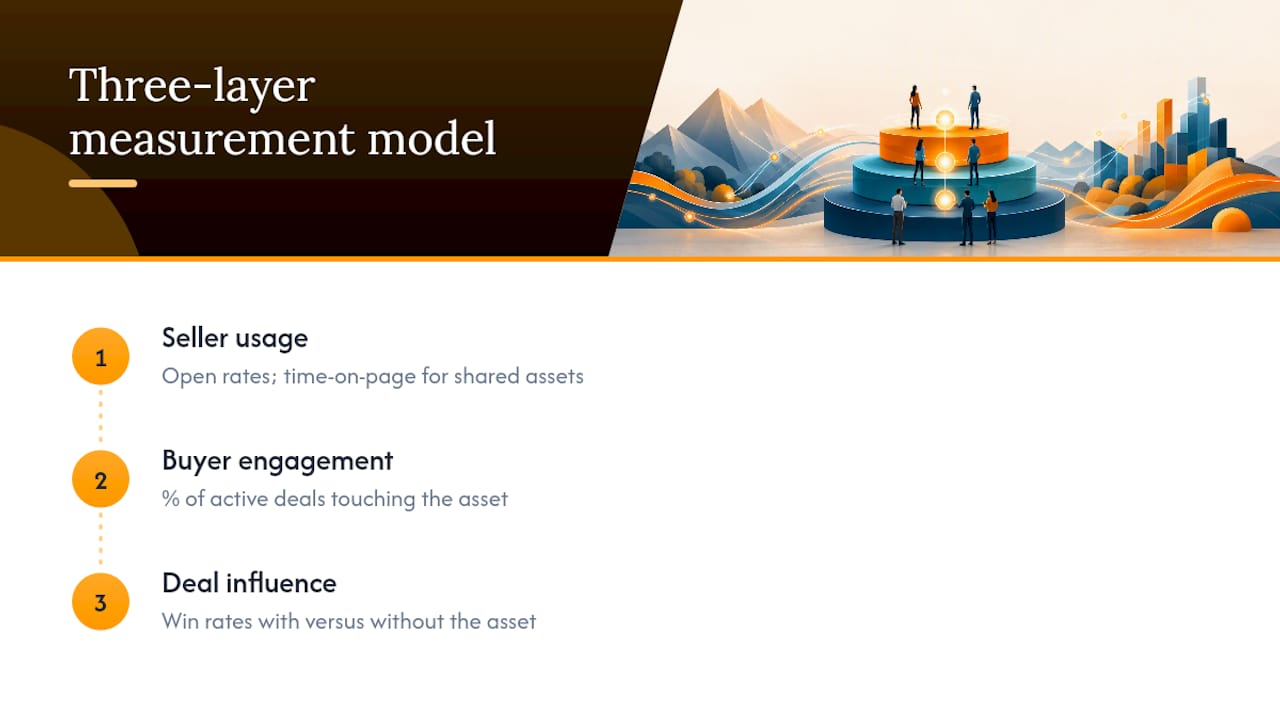
Practical metrics to track include open rates and time-on-page for shared assets, the percentage of active deals touching a given piece of content, and win rates for deals where a specific asset appeared versus deals where it didn’t. Teams that centralize content and tie it to these numbers tend to see stronger alignment between marketing output and revenue growth, largely because decisions about what to build next stop being guesses.
Set a monthly review cadence: anything with usage below a defined threshold, or with zero correlation to deal outcomes after ninety days, goes into a refresh-or-retire queue. Waiting longer than a month to catch that trend usually means a whole quarter’s worth of reps quietly avoiding an asset nobody flagged as broken.
Real Playbooks From The Artist Evolution’s Client Work
Theartistevolution has built brand narratives and campaign assets across healthcare, legal, retail, and CPG accounts, and the pattern holds across industries: the strongest enablement content starts with a client’s own language, not a template pulled off a shelf.
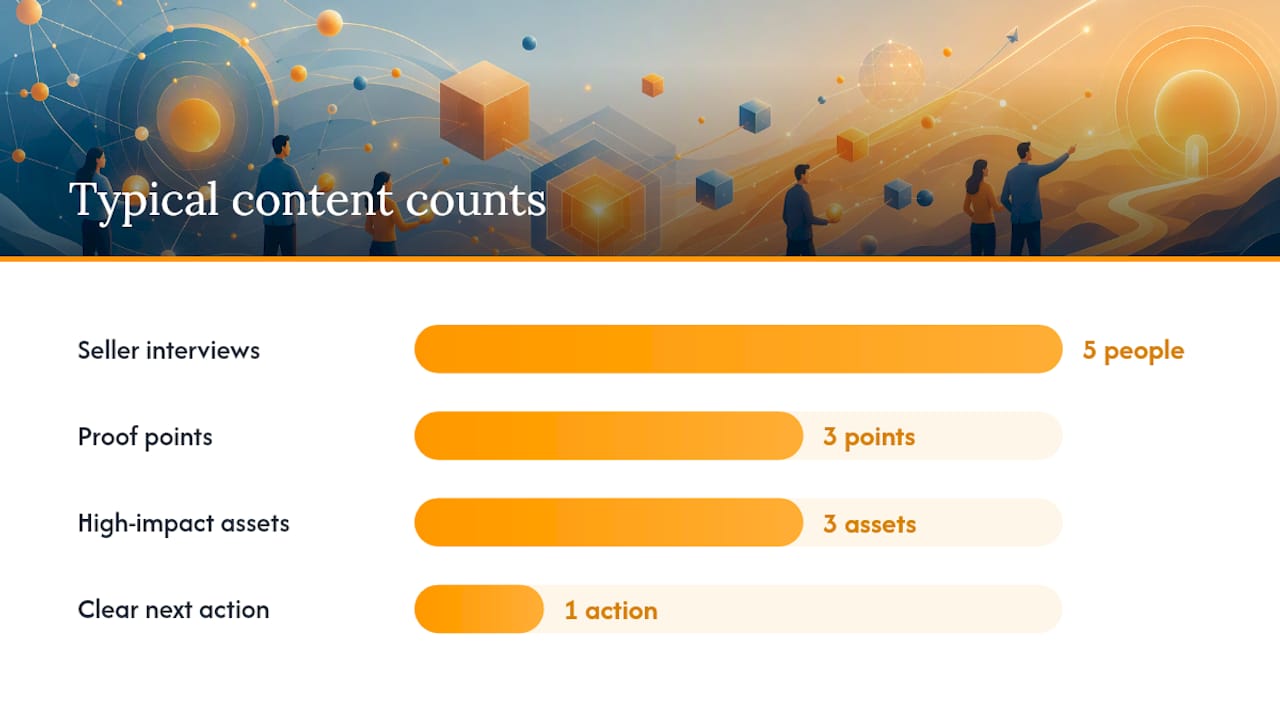
A simple win-story framework any team can adapt: Problem (one sentence on the buyer’s situation before you), Solution (what changed), Result (a specific, named outcome). A buyer-facing one-pager checklist follows the same discipline: headline claim, three proof points, one clear next action, nothing else competing for attention.
A 90-day enablement pilot works well as a starting structure:
- Days 1 to 30: Audit existing assets, interview five sellers, tag the library.
- Days 31 to 60: Build or refresh the three highest deal-impact assets.
- Days 61 to 90: Track usage and engagement, then report deal influence to leadership.
What Most Teams Get Wrong About Enablement Content
The biggest failure mode isn’t a lack of content. It’s content chaos: duplicate battlecards, stale case studies still circulating a year after the client churned, and no clear place to search. Three quick wins fix more than any six-month strategy document: run the staleness audit this week, tag your top twenty assets by deal stage, and interview three sellers about what they’re improvising. All three take a day, not a quarter.
— Derek
Get Hands-On Help Building Your Enablement Content Library
A specialized marketing agency can give revenue teams a faster path to a working enablement library than building one from scratch in-house, because such partners often have experience building brand narratives, one-pagers, and campaign assets across healthcare, legal, retail, and CPG accounts. Instead of your team learning content strategy by trial and error over two quarters, you get a team that has already made those mistakes on someone else’s dime.
Brand development work translates directly into the case studies, one-pagers, and positioning frameworks your sales team needs for external-facing decks. Campaign strategy and ongoing management keeps that content current instead of letting it go stale six months after launch, and the agency’s marketing tools support the library infrastructure that keeps everything tagged and searchable. If your current asset library is more improvisation than system, a marketing assessment is the direct next step: it maps what you already have against what your sellers actually need, and gives you a prioritized plan instead of a guess.
Sources
- What is sales enablement content? — Sales Enablement Collective
- What is voice of the customer — Deeto
- 10 types of sales enablement content and how to create them — Atlassian (Loom)
FAQ
What Is Sales Enablement Content?
Sales enablement content is any internal or external resource, such as a battlecard, case study, or ROI calculator, that helps a seller advance a deal or helps a buyer justify the purchase to their own stakeholders.
What Are the Three Pillars of Sales Enablement?
Definitions vary across the industry, but a common framing centers on content, training, and coaching, with technology (like CRM integration and content libraries) supporting all three.
Which of the Following Is an Example of Sales Enablement Content?
Battlecards, playbooks, case studies, one-pagers, demo videos, and ROI calculators are all examples, split between internal seller-facing assets and external buyer-facing assets.
What Are the Four Pillars of Enablement?
Some frameworks expand the three-pillar model to include content, training, coaching, and technology or analytics, though the exact count and naming shift depending on the source.
How Often Should We Audit Our Content Library?
A quarterly audit, flagging anything untouched for 6 to 12 months, keeps a library credible and prevents stale assets from undermining seller trust.